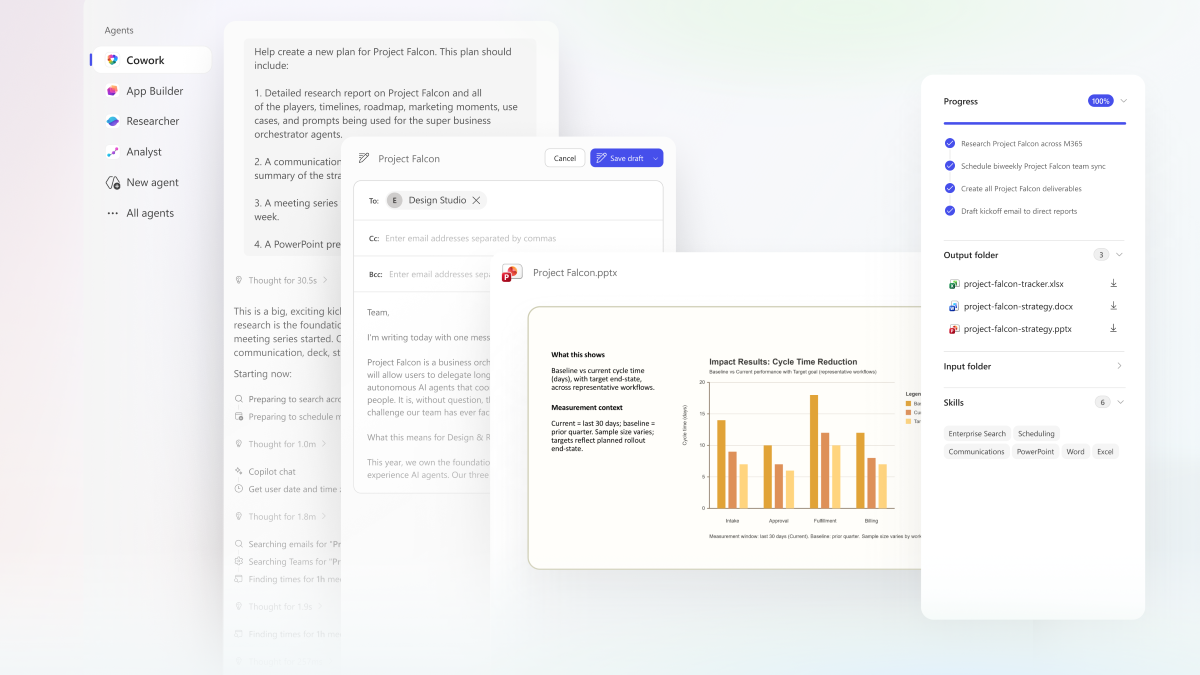
On March 9, 2026, Microsoft introduced Copilot Cowork as the move from “Copilot can answer” to “Copilot can carry work forward.” On March 30, 2026, Microsoft said Cowork was available through the Frontier program. As of the Microsoft Learn and Support documentation updated in late March and early April 2026, Cowork is still explicitly documented as a preview/prerelease capability, gated through Frontier and still evolving. S1 S2 S3 S5 S8
That date sequence matters, because Cowork is not just another prompt box. It is Microsoft 365 Copilot’s first serious “plan to action” surface for long-running work: you describe an outcome, Cowork turns it into a plan, grounds it in your tenant context, loads skills, asks for approvals on sensitive steps, and keeps state in a visible task view while it works. S1 S2 S4 S8 S10
The most interesting detail is the extensibility story. Microsoft documents a user-level custom skill mechanism where you drop SKILL.md files into OneDrive under /Documents/Cowork/Skills/, and Cowork discovers them automatically at the start of each conversation. That is powerful, but it is also easy to misunderstand. These custom skills are not code plugins and they are not new tool runtimes. They are instruction packs that shape how Cowork plans and executes within the permissions and tools it already has. That distinction is the real technical story. S4 S7 S10
At a Glance
- Cowork is still a Frontier preview feature, not a broadly stable GA surface. S2 S3 S5 S8
- Microsoft positions Cowork as a long-running, multi-step execution surface, not just chat. S1 S2
- The backend story is Work IQ: Microsoft’s data, context, and skills-and-tools intelligence layer for Microsoft 365 Copilot. S1 S2 S7
- Cowork ships with built-in skills such as Word, Excel, Email, Scheduling, Deep Research, and Adaptive Cards, and it can also discover user-authored
SKILL.mdfiles from OneDrive. S4 S6 S10 - Sensitive actions require approval, task execution is visible in the UI, and admins can scope, deploy, pin, audit, and govern Cowork like other Microsoft 365 Copilot agents. S3 S5 S8 S10
- Custom skills are capped at 20 custom skills (each defined by a
SKILL.mdfile), with each file limited to 1 MB. Microsoft explicitly says user-created custom skills are not validated by Microsoft. S4 S6 - Cowork uses Anthropic models as a subprocessor – a precise legal term meaning Anthropic processes data under Microsoft’s contractual framework, not under Anthropic’s own terms. S3 S8 S11
- Important for EU tenants: Anthropic models are excluded from the EU Data Boundary by default and are disabled for EU/EFTA/UK customers unless an admin explicitly opts in. S11
Copilot Cowork Is Not Claude Cowork
Before going further: there are two products with similar names, and confusing them leads to real misunderstandings.
Claude Cowork is Anthropic’s standalone desktop product for knowledge work. Anthropic says it runs on your computer, works across local files, folders, and applications, and is currently available as a research preview through the Claude desktop app. S14
Copilot Cowork is Microsoft’s cloud-based Microsoft 365 agent – the subject of this article. Microsoft built it using the technology behind Claude Cowork, as Charles Lamanna’s March 9 post states explicitly. S1
| Aspect | Claude Cowork (Anthropic) | Copilot Cowork (Microsoft) |
|---|---|---|
| Where it runs | On your desktop through the Claude desktop app | In the Microsoft 365 cloud and tenant context |
| Primary working set | Local files, folders, and applications | Microsoft 365 data, context, and skills via Work IQ |
| Availability | Research preview | Frontier preview |
| Governance plane | Anthropic product controls | Microsoft 365 identity, Purview, DLP, audit, and admin controls |
The underlying agentic lineage is shared. The governance wrapper, data plane, identity model, and deployment model are not. When enterprise architects ask “Should we use Claude Cowork or Copilot Cowork?”, the answer is mostly a governance and data-plane question, not just a model question. S1 S11 S14
Cowork Is Not “Chat Plus”
The simplest way to misread Cowork is to think of it as Copilot Chat with a few extra buttons. Microsoft’s own wording is stronger than that.
Charles Lamanna’s March 9 post describes Cowork as the thing that helps Copilot “take action, not just chat.” Jared Spataro’s March 30 post says the same thing in more operational language: Cowork creates a plan, reasons across your tools and files, and carries work forward with visible progress and opportunities to steer. The April Support article adds the concrete task surface: Cowork can send emails, schedule meetings, create documents, post in Teams, browse files, run recurring prompts, and manage multi-step work over time. S1 S2 S3
That makes Cowork more interesting than a drafting assistant. It is closer to an execution-oriented agent shell inside Microsoft 365:
flowchart LR
  U["User describes an outcome"] --> P["Cowork planner"]
  P --> W["Work IQ"]
  W --> D["Data layer: Outlook, Teams, OneDrive, SharePoint, tenant signals"]
  W --> C["Context layer: semantic index, memory, relationships"]
  W --> S["Skills and tools layer"]
  S --> X["Built-in skills and available tools"]
  X --> A["Proposed actions and file operations"]
  A --> H["Human approval for sensitive actions"]
  H --> O["Outputs in OneDrive/SharePoint and task history"]
This matters operationally because Cowork externalizes state. Most copilots make you infer what happened from the final answer. Cowork exposes a progress bar, step log, output folder, loaded skills, schedule state, and permissions state as it runs. That is the beginning of a real operator control plane. S3 S10
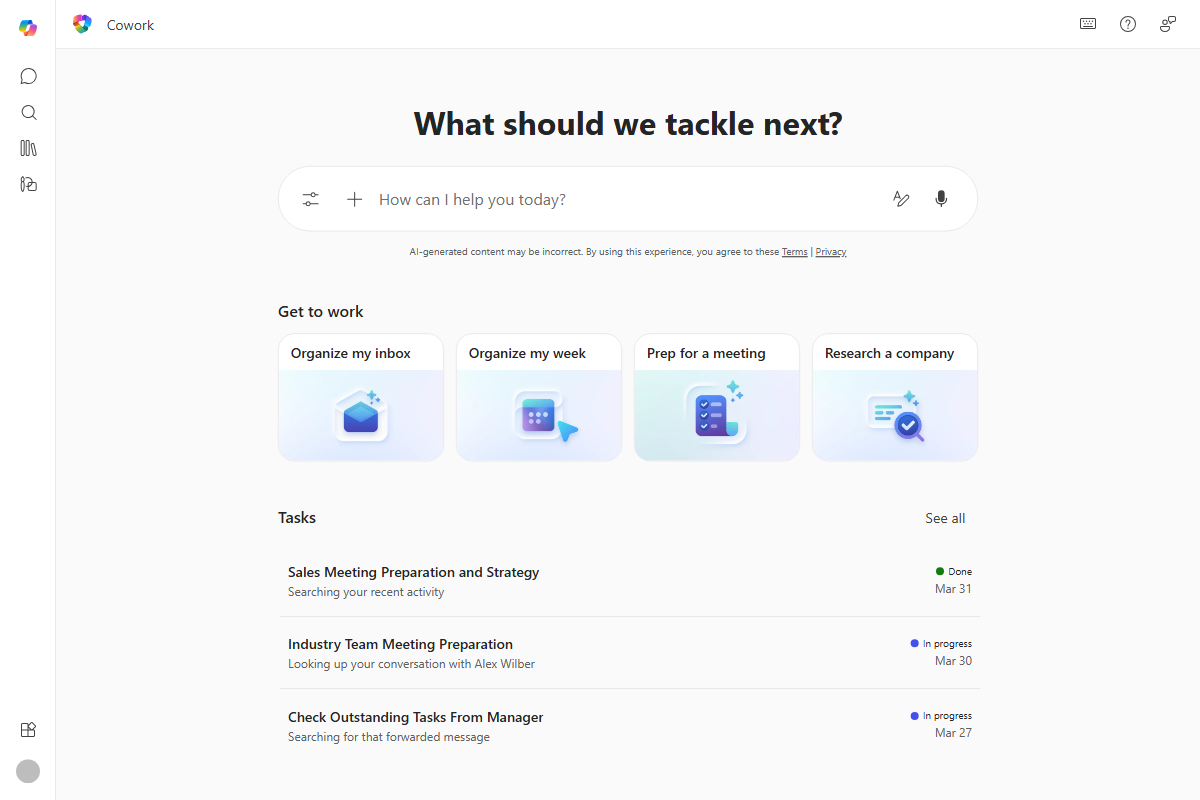
Official Microsoft Support imagery for Cowork’s home surface: suggested prompt starters, recent tasks, and an explicit task-oriented entrypoint instead of a blank chat canvas. S3
Work IQ Is the Real Substrate
If Cowork is the execution surface, Work IQ is the intelligence substrate that makes it viable.
In Seth Patton’s March 9 Work IQ deep dive, Microsoft describes Work IQ as a three-layer system:
- Data: Microsoft 365 tenant data, metadata, collaboration signals, and optionally connector-fed business data.
- Context: memory, semantic index, relationships, and organizational understanding.
- Skills and tools: specialized instructions plus execution surfaces such as toolsets, APIs, plugins, and MCP-aligned capabilities. S7
That architecture explains why Cowork feels different from a simple “prompt in, paragraph out” assistant. Cowork is not reasoning over a single attached file. It is reasoning over a permissioned work graph, with retrieval and execution paths already inside Microsoft 365. S1 S7
There is also a second layer to the story: multi-model orchestration.
Microsoft says two related things in the official corpus:
- Microsoft integrated “the technology behind Claude Cowork” into Microsoft 365 Copilot. S1
- Cowork uses Anthropic models as a subprocessor within Microsoft’s managed service boundary. S3 S6
That is why the March 30 announcement can say Cowork has “skills from Claude and Microsoft built in” while the Responsible AI and FAQ pages still describe Cowork as a Microsoft 365 Copilot feature operating under Microsoft 365’s security, approval, and tenant-governance boundaries. S2 S6 S8
The practical implication is simple: Cowork is not a standalone Anthropic product inside your tenant. It is a Microsoft-orchestrated Microsoft 365 Copilot capability that uses a multi-model backend and Work IQ for grounding. S2 S7 S8
What “Subprocessor” Actually Means
Because the Anthropic relationship generates questions, it is worth being precise. Microsoft’s dedicated subprocessor documentation states that Anthropic has onboarded as a Microsoft subprocessor and operates with Microsoft oversight under Microsoft’s contractual safeguards, product terms, and DPA. S11
That means Anthropic processes your data under Microsoft’s contractual framework – not under Anthropic’s own terms. Microsoft’s Customer Copyright Commitment, Enterprise Data Protection, and your existing DPA still apply.
The important carve-out is regional. Anthropic models are excluded from the EU Data Boundary and are disabled by default for customers in the EU, EFTA, and UK. If your tenant is in one of those regions, an admin must explicitly enable the Anthropic subprocessor setting before those capabilities are available. Anthropic models are also unavailable in government clouds and sovereign clouds. S11
The Side Panel Is the Control Plane
The UI is one of Cowork’s most important design decisions.
Microsoft’s Support documentation describes the right-side panel as a live view of:
- Progress: percentage complete plus a step-by-step execution log.
- Input folder: files you supplied.
- Output folder: files Cowork created, with preview and download actions.
- Skills: the skills Cowork loaded during execution.
- Schedule: recurring prompts you created.
- Permissions: approved tools and remembered approvals. S10
That is not cosmetic. It is the minimum viable interface for human-in-the-loop execution.
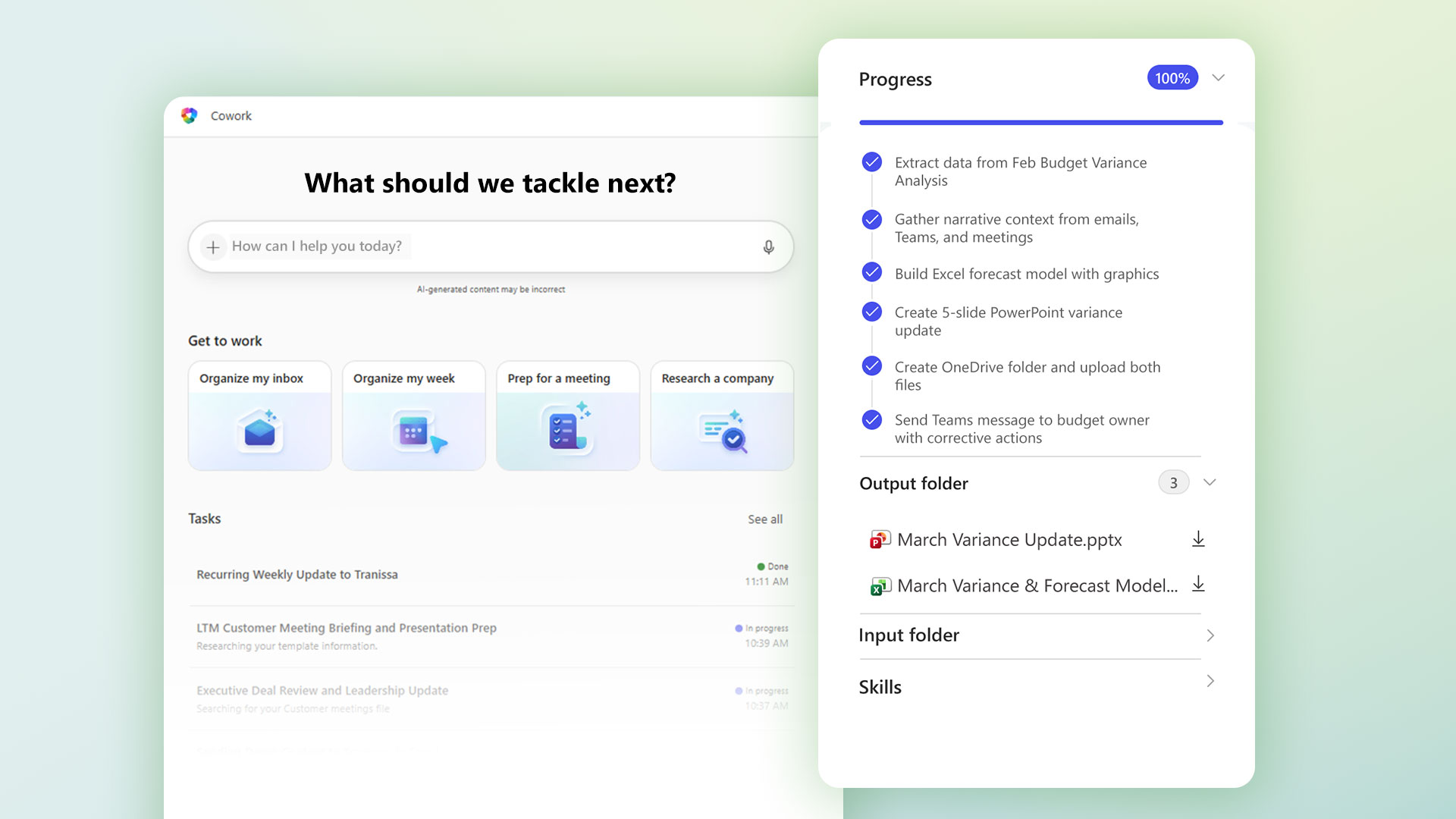
Official Microsoft imagery highlighting the execution-state model: progress steps, output folder, and skill visibility all live beside the conversation. S2 S10
Approval Handling
Approval handling is similarly explicit. Microsoft documents approval prompts with slightly different terminology across the Support and Learn pages, which likely reflects the UI still evolving:
| Support page wording | Learn documentation wording | Effect |
|---|---|---|
| Approve | Action button (for example, “Send,” “Post,” or “Create”) | Allow this one time |
| Approve & Remember | Don’t ask again | Allow similar actions for the current conversation |
| - | Approve All | Batch-approve multiple pending actions at once |
| Reject | Cancel | Block the action and let Cowork move on |
For high-risk or medium-risk actions, Microsoft says the approval prompt shows a risk indicator, and in some cases a full preview of the content plus a Show parameters option for technical details. That is exactly the kind of affordance you want if your concern is not “Can the model write?” but “Can the system execute safely?” S6 S10
Cowork also exposes task lifecycle explicitly. The Support article documents task statuses of In progress, Needs user input, Done, and Failed, and the FAQ adds conversation controls for Pause, Resume, and Cancel. S6 S10
This is the big UI-level difference between Cowork and a normal assistant: Cowork behaves like an active workload queue.
Built-In Skills, Custom Skills, and Tools Are Not the Same Thing
The Microsoft documentation mixes the words “skills,” “tools,” and “agents” in ways that are easy to blur together. They should be separated.
| Layer | Where it lives | Who authors it | What it changes | What it does not do |
|---|---|---|---|---|
| Built-in Cowork skills | Microsoft service | Microsoft, with Cowork’s multi-model stack behind it | Document creation, email, scheduling, search, research, briefing, adaptive-card behavior | It is not user-editable in your OneDrive |
| Custom OneDrive skills | /Documents/Cowork/Skills/<name>/SKILL.md | You or your organization | Planning, instruction priority, output shape, task framing | It does not add new APIs, auth, or runtime code by itself |
| Work IQ tools / broader agent platform | Platform backend and developer surfaces | Microsoft and developers | Actual tool execution, connectors, APIs, agent flows, plugins, MCP-oriented tooling | It is not provisioned by dropping Markdown into OneDrive |
Microsoft’s Work IQ article is the key clarifier here. It says the skills and tools layer contains both specialized instructions and toolsets, and that Microsoft is building toolsets using “MCP server tools, agent flows, APIs and plugins.” Separately, the Cowork product docs say user extensibility works by creating SKILL.md instruction files in OneDrive. S4 S7 S10
Inference: Cowork’s current user-facing custom-skill mechanism is best understood as an instruction-level extension model, not a runtime plugin model.
That is not a weakness. It is actually a pragmatic design. Instruction files are dramatically easier to govern than arbitrary code. But it means you should not expect a OneDrive custom skill to behave like a Copilot Studio connector, an MCP server, or a server-side action provider.
A Note on MCP
The Work IQ article says Microsoft is working toward MCP and A2A support for the Work IQ API, and Microsoft’s Copilot Studio documentation now treats MCP as a supported extension path for agents. Microsoft’s release plans also show custom MCP server support moving into general availability in Copilot Studio in April 2026. S7 S12
For now, MCP matters at the developer platform layer of the stack, not at the end-user SKILL.md layer. A OneDrive skill is still an instruction pack, not an MCP client. But the direction of travel is clear enough that any Cowork-adjacent platform design should assume MCP will matter upstream. S7 S12
The Built-In Skill Model
Microsoft currently documents the following out-of-the-box Cowork skills:
- Word
- Excel
- PowerPoint
- Scheduling
- Calendar Management
- Meetings
- Daily Briefing
- Enterprise Search
- Communications
- Deep Research
- Adaptive Cards S4 S6 S10
Those skills map cleanly into four execution classes:
| Class | Skills | Why it matters |
|---|---|---|
| Document actuators | Word, Excel, PowerPoint, PDF | Cowork can create and edit actual artifacts, not just talk about them |
| Communication actuators | Email, Scheduling, Calendar Management, Meetings, Daily Briefing, Communications | Cowork reaches into the real coordination layer of work |
| Retrieval and analysis | Enterprise Search, Deep Research | Cowork can ground tasks before generating deliverables |
| Presentation surface | Adaptive Cards | Cowork can render structured, interactive responses inside the conversation |
That grouping is my categorization, not Microsoft’s naming scheme, but it helps explain how Cowork composes work. A “monthly budget review” is rarely just Excel. It is search, Excel, Communications, maybe PowerPoint, and often Email or Scheduling in the same run.
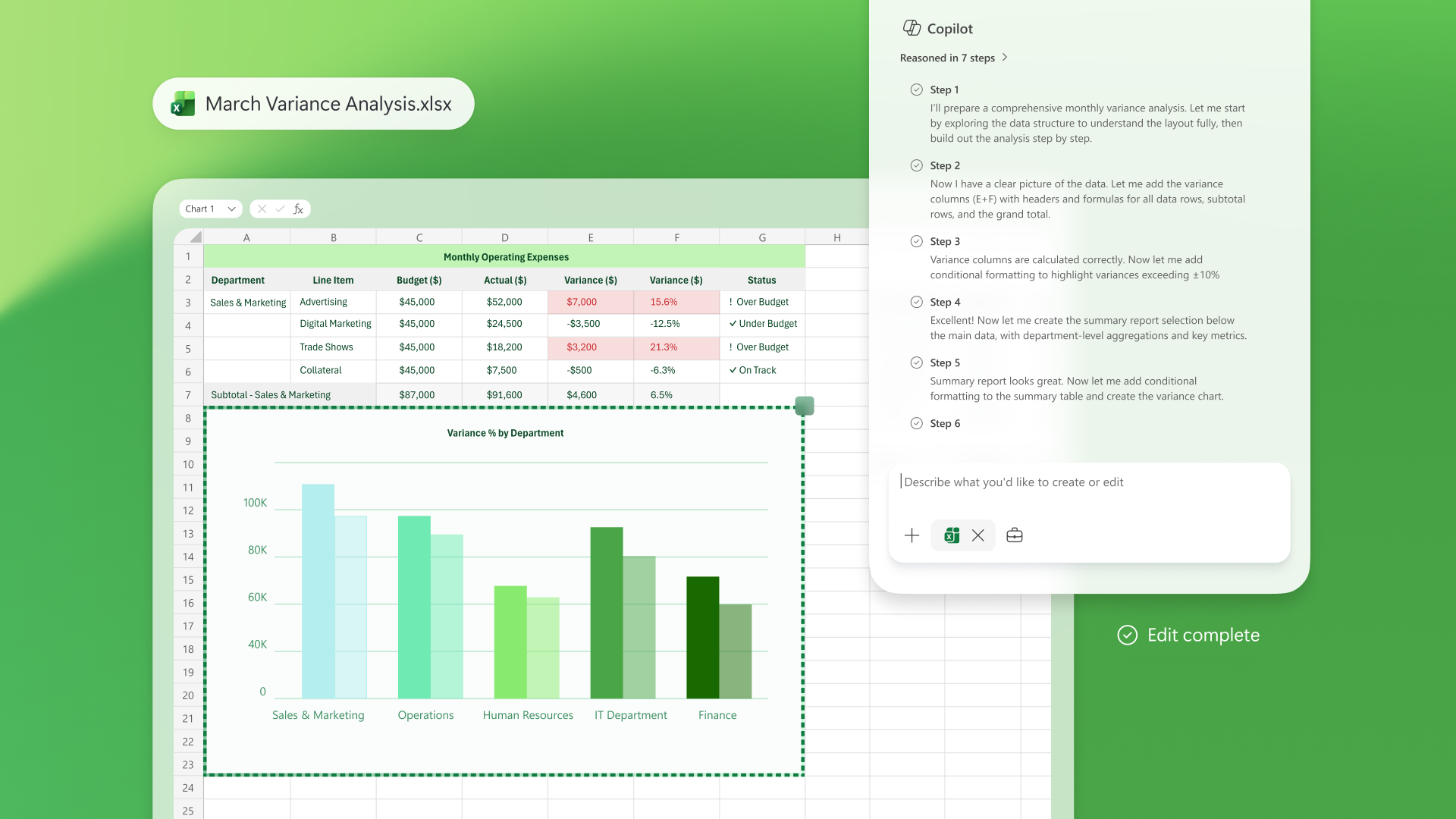
Official Microsoft imagery for an Excel-centered execution flow: reasoning steps, document edit state, and completion marker. It is not specific to OneDrive skills, but it does show the broader skill-to-output interaction model Microsoft is building into Copilot. S2
The OneDrive Skill Model Is Real
This is the part most people will miss if they only read the announcement blogs.
Microsoft’s Learn and Support docs say you can extend Cowork by placing custom skill files in OneDrive under:
/Documents/Cowork/Skills/
The documented structure is:
/Documents/Cowork/Skills/
  weekly-report/
    SKILL.md
  meeting-packet/
    SKILL.md
  budget-review/
    SKILL.md
Each SKILL.md contains:
- A YAML front matter block.
- A
name. - A
description. - Markdown instructions. S4
Microsoft’s example is deliberately minimal:
---
name: Weekly Report
description: Generates a weekly status report from my recent emails and calendar.
---

Gather my sent emails and calendar events from the past week, then create
a summary document organized by project.
Cowork discovers these custom skills automatically at the start of each conversation. Microsoft also documents two hard limits:
- up to 20 custom skills (one per subfolder, each defined by its own
SKILL.md) - up to 1 MB per
SKILL.mdfile S4
That means your design target is not “write one giant operating manual.” It is “write compact, high-signal playbooks for recurring outcomes.”
What This Mechanism Can Do
Used well, a OneDrive skill can:
- standardize the steps Cowork takes for a repeated workflow;
- force a preferred output structure;
- bias Cowork toward specific source types or folders;
- add explicit guardrails such as “ask one clarifying question instead of guessing”;
- keep recurring work consistent across runs.
What This Mechanism Cannot Do
Based on the documented format, a OneDrive skill cannot by itself:
- register a new API;
- create a new authenticated connector;
- inject executable code into Cowork;
- bypass Microsoft approval prompts;
- bypass your existing Microsoft 365 permissions;
- self-validate or guarantee correctness. S4 S6 S10
Inference: Because discovery happens only at the start of each conversation, the safest operational assumption is that skill edits should be tested in a new conversation, not relied on to hot-reload into an in-flight task.
Three Custom Skill Patterns That Actually Fit Cowork
The right way to think about Cowork custom skills is not “What clever prompt can I write?” It is “What repeatable work pattern inside Microsoft 365 do I want to make deterministic?”
1. Weekly Executive Update
This is the cleanest first pilot because it stays inside Cowork’s native surfaces: email, calendar, file creation, and Teams drafting.
---
name: Weekly Executive Update
description: Draft a Friday leadership update from my recent work signals.
---

Use only the current work week unless I specify another period.
Review my sent mail, calendar events, and files touched this week.
Create:
1. a one-page Word update with sections for wins, risks, decisions needed, and next week;
2. a short Teams-ready summary;
3. a list of missing evidence if the signal is weak.
Do not send or post anything until I approve.
If evidence is insufficient, say so explicitly instead of guessing.
Why it fits: Cowork already has the built-in capabilities needed for this workflow, and the skill mainly improves consistency and output structure.
Tradeoff: You gain repeatability, but you may miss context that lives outside the declared time window.
Failure mode: The update sounds polished but ignores the most important unresolved issue.
Mitigation: Force a “decisions needed” section and an “insufficient evidence” path.
2. Monthly Budget Review
This is the best example of a skill that coordinates multiple Cowork capabilities without pretending to be a plugin.
---
name: Monthly Budget Review
description: Build a variance summary and communications pack from the latest finance workbook.
---

Find the latest budget workbook in the current conversation or my Finance folder.
Summarize the top five variances, likely drivers, and open questions.
Create:
1. an Excel summary tab;
2. a one-page markdown or Word narrative;
3. a draft Teams update for budget owners.
Never send or post the update without approval.
If the workbook structure is unclear, ask one clarifying question before proceeding.
Why it fits: Cowork can search, inspect, summarize, create files, and draft communication around the analysis.
Tradeoff: The more generic the workbook assumptions, the more likely Cowork is to misread custom finance models.
Failure mode: Cowork summarizes the wrong worksheet or treats staging tabs as authoritative.
Mitigation: Name the preferred folder, expected worksheet pattern, and escalation rule in the skill.
3. Meeting Packet Builder
This is where Cowork starts to feel like an actual background coworker rather than an assistant.
---
name: Meeting Packet Builder
description: Prepare a briefing packet, deck, and follow-up draft for important meetings.
---

For the selected meeting, gather the latest emails, meeting notes, and relevant files.
Create:
1. a briefing document with attendees, objectives, open issues, and risks;
2. a short presentation deck;
3. a follow-up email draft with agreed next steps.
Schedule 30 minutes of prep time before the meeting if my calendar allows it.
Show me all outputs and proposed scheduling changes before execution.
Why it fits: This pattern uses Calendar, Meetings, Enterprise Search, Word, PowerPoint, and Email in one coherent workflow.
Tradeoff: The workflow is high leverage, but also high risk, because it crosses more surfaces.
Failure mode: Cowork pulls stale files or proposes a calendar change that clashes with a higher-priority commitment.
Mitigation: Keep approval gates on, prefer named source folders, and require the output packet to cite source files.
Best Practices for Writing Cowork Skills
Microsoft documents only the bare minimum format. The rest is prompt engineering discipline.
- Write skills around one repeatable business outcome, not a vague domain.
- Tell Cowork what source signals to prefer: time window, folders, file types, or current-conversation attachments.
- Tell Cowork what to do when evidence is weak: ask once, stop, or mark uncertainty explicitly.
- Specify exact output shapes: Word memo, Teams post draft, Excel summary tab, PowerPoint deck, OneDrive folder.
- Keep send/post steps behind approval even if the workflow seems routine.
- Split monolithic skills into smaller playbooks. You only get 20 slots, but giant skills are still worse than targeted ones.
- Treat
descriptionas a routing hint. Make it concrete enough that Cowork can recognize when to use the skill. - Restart the conversation after editing a skill, because Microsoft says discovery happens at conversation start. S4
The key pattern is this:
Bad skill: “Help me with finance.”
Good skill: “From the latest monthly-close workbook and related emails, create a top-five variance summary, a finance-leadership Teams draft, and a list of unresolved questions. Do not send anything until I approve.”
The Real Constraints You Have to Design Around
Cowork is flexible, but it is not open-ended.
| Constraint | What Microsoft documents | Why it matters |
|---|---|---|
| Prompt size | Up to 16,000 characters per message S3 | Long operating manuals should be broken into skill files or staged tasks |
| Custom-skill limit | 20 custom skills, 1 MB per SKILL.md S4 | Optimize for compact, reusable playbooks |
| File handling | Wide file support, but attachments must be under 200 MB S6 | Large media or archives are still bounded |
| Local files | You can upload files from your device, but Cowork cannot access or edit arbitrary local files on disk S3 S6 | Persistent workflows should live in OneDrive or SharePoint |
| Delete behavior | Cowork cannot delete files or folders in OneDrive or SharePoint S6 S10 | Cleanup still belongs to a human or another governed workflow |
| Encryption | Cowork cannot read encrypted files, even if the user has access S6 | Protected content can become a silent source gap, especially with sensitivity-labeled files |
| Preview support | Support and FAQ pages do not list exactly the same preview formats S6 S10 | Preview coverage is still moving in preview |
| Custom-skill validation | User-created custom skills are not validated by Microsoft S6 S10 | Quality control is your job |
| EU/EFTA/UK | Anthropic models are disabled by default and require admin opt-in S11 | If your tenant depends on the EU Data Boundary defaults, Cowork’s Claude-backed capabilities will not be on by default |
| Government clouds | Anthropic models are unavailable in GCC, GCC High, DoD, and sovereign clouds S11 | Public sector tenants should check availability before designing Cowork workflows |
There are two documentation wrinkles worth calling out explicitly:
- The admin page says Cowork is available to all Microsoft 365 Copilot tenants and is available to licensed users by default, but the Support page says the rollout is still limited to Frontier early access in select markets and languages, starting with United States / English (en-us) within Frontier. Expanded access is coming soon. S3 S5
- The Support article lists Word and PowerPoint as inline preview types, while the FAQ lists a narrower set centered on PDF, CSV, Markdown, images, and HTML. S6 S10
My reading: the product is moving fast enough that the preview docs are not fully normalized yet. Treat the more restrictive interpretation as your design baseline until your tenant proves otherwise.
Governance, Security, and Why Cowork Is Enterprise-Relevant
Cowork would not matter if it were just a strong model wrapped in a prettier UI. The reason it matters is that Microsoft is explicitly placing it inside Microsoft 365’s governance envelope.
The documented controls include:
- Authentication through your Microsoft 365 identity and existing permissions. S8
- Tenant isolation. S8
- Files saved into OneDrive and SharePoint. S6 S8
- DLP enforcement through Microsoft Purview. S5
- Audit logging for Cowork interactions under Copilot activities, including agent name, ID, and version. S5
- Local-region data residency by default, plus ADR and Multi-Geo support. S5
- Explicit approval gates for sensitive actions. S6 S10
- No use of your organizational data to train AI models. S8
- Anthropic models operate under Microsoft’s contractual framework as a subprocessor, not under Anthropic’s standalone commercial terms. S11
This is also where the admin story becomes concrete. Microsoft says admins can:
- make Cowork available to all users;
- scope it to specific users or groups;
- block it entirely;
- deploy it on behalf of users;
- pin it in the Copilot rail. S5
That is enough to run a proper enterprise pilot.
The most interesting admin detail is this line from the Learn governance page: when you deploy Cowork, “the deployment process accepts users’ permissions on their behalf.” S5
That is not inherently bad, but it means you should be careful about how broadly you predeploy. A pinned or preinstalled agent feels “default.” If you are still learning approval patterns and failure modes, start with scoped access, not whole-tenant visibility.
The EU Question Is Not Optional
If your organization operates in the EU, EFTA, or UK, you need an explicit decision on the Anthropic subprocessor toggle before you design any Cowork workflow that depends on Claude-backed capabilities. The default is off. If your governance team has not approved that setting, Cowork may still be present, but the Anthropic-backed path will not be. Understand that before you start writing workflows that assume it. S11
Observability and an SLO Model That Actually Fits Cowork
Microsoft gives you three native observability surfaces:
- the in-product progress log and task states;
- the permissions and schedule state visible in the side panel;
- Purview audit logs for Cowork activity. S5 S10
That is enough to build a real operating model, but not enough to run one passively. I would define the pilot metrics like this:
task_done_rateneeds_user_input_rateapproval_reject_rateapproval_remember_ratescheduled_prompt_success_rateoutput_rework_ratecustom_skill_invocation_sharetime_to_first_clarificationaudit_coverage_sample_ratedlp_block_rate
And I would use release gates like these before widening rollout:
| Dimension | Gate |
|---|---|
| Task completion | At least 80% of pilot tasks finish as Done without restart |
| Human control | 100% of sampled send/post/schedule mutations show an approval event |
| Clarity | Fewer than 20% of tasks stall in Needs user input for more than 15 minutes |
| Rework | Fewer than 25% of output files need full rewrite rather than light editing |
| Governance | DLP and audit events appear for every sampled sensitive workflow |
Those are my recommended operating thresholds, not Microsoft product defaults. But they fit the actual product shape Microsoft has documented.
A Rollout Plan That Does Not Create Approval Fatigue
If you want Cowork to succeed, do not roll it out as “everybody now has an agent.”
Phase 1: Get Frontier and admin visibility correct
- Confirm Frontier enrollment.
- If Cowork is missing in Admin Center, make sure the admin account itself is enrolled in Frontier. S5 S9 S10
- Validate environment support. Microsoft’s Support and FAQ docs point to the browser experience and Microsoft 365 Copilot desktop app for Windows and Mac, while the FAQ says mobile is not yet available. S3 S6
- For EU/EFTA/UK tenants: decide on the Anthropic subprocessor toggle before designing any workflows. S11
Checkpoint: If your admins cannot see the agent consistently, stop here. Do not start writing custom skills against a surface your operators cannot govern.
Phase 2: Pilot with a security-group cohort and built-in skills only
- Use a small pilot group.
- Do not use whole-tenant deployment.
- Run four workflows first: inbox triage, meeting packet, company research, monthly budget review.
- Observe approval frequency, failure modes, and task-state behavior. S5 S10
Checkpoint:
If approval prompts are constant noise or tasks frequently die in Needs user input, your workflow design is too vague.
Phase 3: Add three custom OneDrive skills
- Start with one reporting skill, one meeting-prep skill, and one analytics skill.
- Keep each one narrow.
- Require source citation or explicit uncertainty in the instructions.
- Force all external send/post actions to remain approval-gated.
Checkpoint: If users cannot tell when Cowork followed the skill versus ignored it, the skill is too generic.
Phase 4: Add deployment and pinning after proof
- Predeploy Cowork only after the pilot workflows are stable.
- Pin it only for the groups that have trained on the approval model.
- Review Purview audit samples and DLP behavior before expansion. S5
Checkpoint: If your governance team cannot answer “what did Cowork do, on whose behalf, and under which approval path?”, do not scale.
Licensing Context
At time of writing, Cowork requires a Microsoft 365 Copilot license and Frontier enrollment.
Microsoft has also tied the broader agent governance story to Microsoft 365 E7, which its March 9 official announcements describe as going on sale on May 1, 2026 at $99 per user per month. Microsoft positions E7 as the bundle that combines Microsoft 365 Copilot, Agent 365, Microsoft Entra Suite, and Microsoft 365 E5 security capabilities in one package. S13
If you are planning to expand from Copilot experimentation into governed agent rollout, that bundle timing matters. It changes the conversation from “Can we turn Cowork on?” to “What is the operating model and licensing envelope for scaling governed agents?”
Bottom Line
Microsoft Copilot Cowork is the first Microsoft 365 Copilot capability that feels like a genuine execution shell rather than an answer engine. Its significance is not that it can draft a document or write an email. Microsoft already had those surfaces. The significant change is that Cowork can keep a task alive in the background, show progress, ask for clarification, request approval, create files, and resume work as a tracked workload. S1 S2 S3 S10
The OneDrive skill model is the second important move. It gives end users and teams a lightweight way to encode repeatable playbooks without standing up a full developer extension surface. But that same simplicity is the reason you should understand it correctly: a SKILL.md file is an instruction layer, not a plugin runtime. It can standardize behavior, reduce drift, and improve outcomes. It cannot magically add new tools or replace governance. S4 S7 S10
The governance story is the third move, and for enterprise architects it may be the most important. Anthropic as a subprocessor, Purview audit logging, DLP enforcement, approval gates, and EU Data Boundary controls are the reason Cowork matters in an enterprise context. Claude Cowork and Copilot Cowork share lineage. The governance wrapper is what makes one a Microsoft 365 deployment question and the other a standalone desktop-product choice. S1 S11 S14
That is also why Cowork is interesting to enterprise architects. It sits in a narrow but valuable middle ground:
- more operational than chat,
- less heavy than a full custom agent platform,
- powerful enough to matter,
- still preview enough that you should pilot it like real infrastructure.