Most “Copilot for blogging” setups are fake. They give the model a nicer prompt, maybe a scaffold script, and then act surprised when the output breaks the repo.
That approach fails the moment the repository has real structure:
- Hugo page bundles instead of one flat
posts/folder - local images and downloadable assets
- theme overrides on top of a vendored submodule
- deploy config and build rules
- old posts with inconsistent front matter styles
- companion materials like quizzes, flashcards, or social copy
I wanted something stricter: a repo where GitHub Copilot could take a scoped topic, research it, scaffold the right bundle, write into the right files, validate the result, and stop before touching generated output.
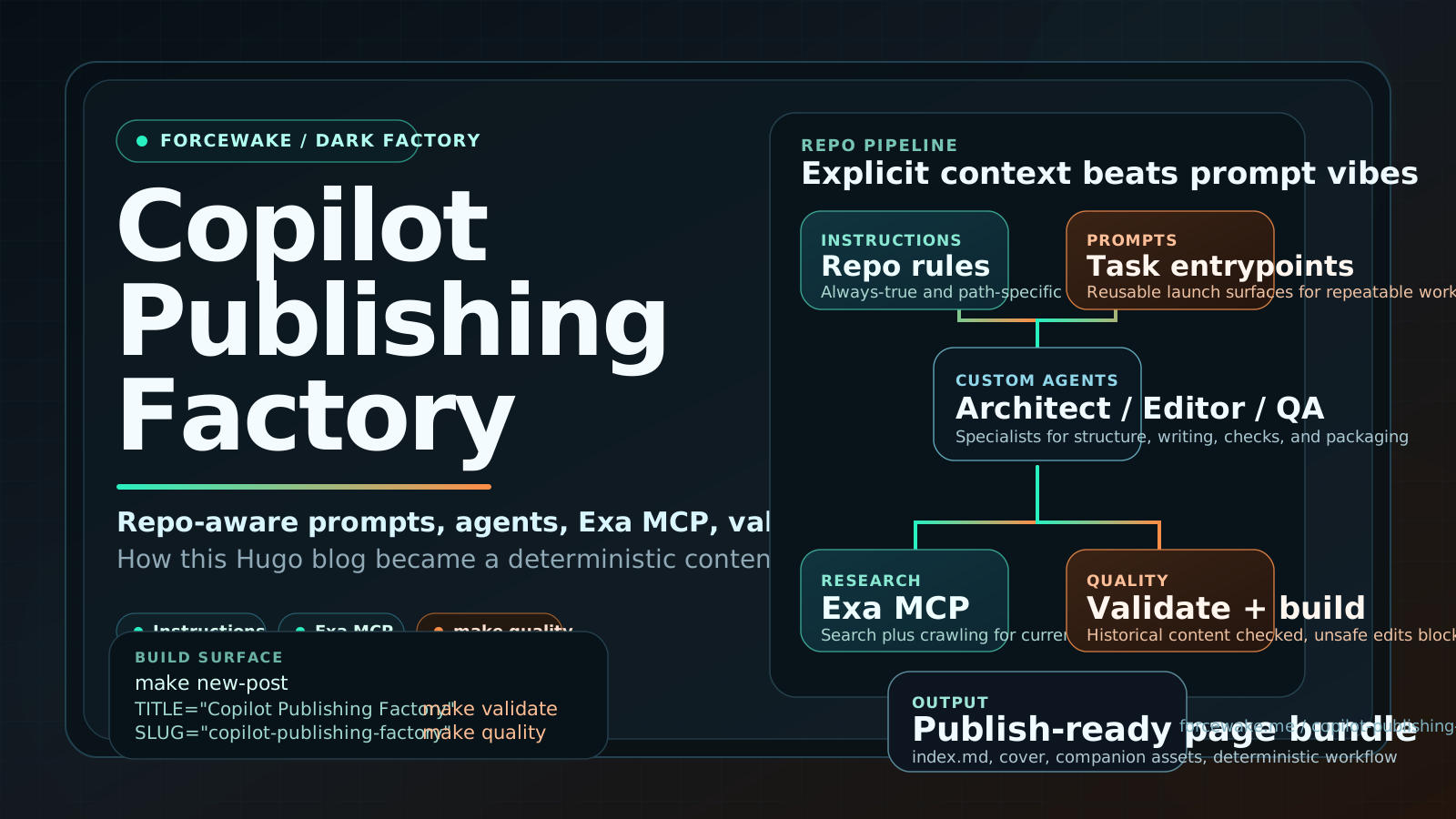
The result is a repo-aware publishing factory built around:
- repository-wide and path-specific instructions
- prompt files for repeatable entrypoints
- custom agents for distinct publishing jobs
- one focused skill for the higher-context procedure
- Exa MCP for research
- deterministic scaffold and validation scripts
- a pre-tool safety hook
- CI that runs the same quality gate the agent uses locally
The key move was not “better prompting.” It was turning the publishing workflow into an explicit repo contract.
Why Generic Copilot Setups Break on Content Repos
As of March 24, 2026, GitHub’s current Copilot guidance is fairly consistent even though the features are documented in different places:
- keep repository instructions short and broadly applicable;
- move file-type-specific rules into path-specific instructions;
- use prompt files for reusable one-shot task entrypoints;
- use custom agents for recurring specialist roles;
- use skills for higher-context procedures;
- use MCP when the default tool surface is not enough;
- use hooks and deterministic commands to constrain autonomous behavior.
That guidance maps cleanly to software repos. It maps even more strongly to content repos, because content repos have more hidden conventions and fewer natural test rails.
If you do not encode those conventions, Copilot has to infer them from history. In practice, that means:
- missing front matter fields
- broken relative asset links
- invented companion files
- edits to generated output
- drift between local IDE workflows and GitHub’s hosted coding agent
That is why generic “here are my writing preferences” instruction files are not enough.
Design Goals
Before touching config, I wrote down the constraints the system needed to satisfy:
- New posts must land in a valid Hugo page bundle.
- The agent must know which files are source and which files are generated.
- Research should be current, not memory-only.
- Local VS Code agent mode and GitHub’s hosted coding agent need separate but documented MCP paths.
- Validation must work on the historical content set, not just on new drafts.
- The workflow must be inspectable in git.
That last point matters more than people admit. If the system only exists in one editor profile, one engineer’s global instructions, or one saved chat session, it is not a repository workflow. It is a personal habit.
At a Glance
Here is the surface area that turned this from “Copilot with nicer prompts” into a factory:
| Layer | Repo Surface | Why It Exists |
|---|---|---|
| Always-on rules | /.github/copilot-instructions.md, /AGENTS.md | Gives Copilot the repo truths that apply almost everywhere |
| File-type rules | /.github/instructions/ | Keeps post, study, layout, and config behavior separate |
| Task entrypoints | /.github/prompts/ | Reusable slash-command workflows in VS Code |
| Specialist roles | /.github/agents/ | Different personas for planning, writing, QA, and packaging |
| Deep procedure | /.github/skills/dark-factory-posting/SKILL.md | High-context publishing playbook without bloating repo-wide instructions |
| Research/tooling | /.vscode/mcp.json | GitHub MCP, Exa MCP, and Playwright MCP in local IDE agent mode |
| Command surface | /Makefile, /scripts/blog/scaffold_post.py, /scripts/blog/validate_posts.py | Deterministic scaffolding and validation |
| Safety and release | /.github/hooks/, /.github/workflows/ | Blocks unsafe edits and runs the same quality gate in CI |
That combination is the factory. Not one file. Not one prompt. The system.
Architecture
This is the pipeline the repo now implements:
flowchart LR
  A["Topic / thesis / audience"] --> B["Prompt file"]
  B --> C["Custom agent"]
  C --> D["Repo instructions + skill"]
  C --> E["Exa MCP / GitHub MCP / Playwright MCP"]
  C --> F["Scaffold command"]
  F --> G["content/posts/YYYY-MM-DD-slug/index.md"]
  G --> H["Validation script"]
  H --> I["Hugo build"]
  I --> J["Publish-ready bundle"]
Each layer has one job. That separation is what makes the setup stable.
1. Repository-Wide Instructions for the Always-True Rules
The repository-wide contract lives in /.github/copilot-instructions.md.
This file does not try to explain the entire workflow. It only tells Copilot the rules that are true almost all the time:
- edit source under
content/,layouts/,assets/,static/,hugo.toml, andnetlify.toml - never hand-edit
public/,resources/, or.hugo_build.lock - treat
themes/PaperModas vendored - use page bundles for new long-form posts
- run
make validateormake qualitybefore finishing
That matches GitHub’s current recommendation for repository custom instructions: keep them broadly applicable and do not turn the file into a giant task manual.
I also added /AGENTS.md because agent instruction files are part of GitHub’s documented custom-instructions hierarchy and are useful across tools that understand them.
2. Path-Specific Instructions for the Places Where Blogging Gets Weird
The repo now has path-specific rules in /.github/instructions/:
post-bundles.instructions.mdstudy-assets.instructions.mdlayouts.instructions.mdhugo-config.instructions.mddeploy-config.instructions.md
This split matters because the rules for content/posts/**/index.md are not the rules for layouts/**/*.html, and neither of those are the rules for netlify.toml.
That sounds obvious, but it is exactly where “one big instruction file” approaches break down. Once the file tries to explain content structure, study assets, theme overrides, deployment behavior, and build rules at once, the useful signal gets diluted.
3. Prompt Files for Repeatable Entry Points
The prompt files live in /.github/prompts/:
new-post-bundle.prompt.mdresearch-to-post.prompt.mdbuild-study-pack.prompt.mdpublish-readiness.prompt.mdrepurpose-linkedin.prompt.md
This is where VS Code prompt files are actually useful. They are not a replacement for repo instructions. They are a reusable task launch surface.
For example, the research prompt now explicitly tells Copilot to:
- use Exa MCP for discovery when available;
- confirm important claims against primary sources;
- write into a valid post bundle instead of inventing a workflow on the fly.
That is a narrow but valuable role for prompt files: not permanent context, but repeatable entrypoints into permanent context.
4. Custom Agents for Distinct Publishing Jobs
I split the work into four agents under /.github/agents/:
dark-factory-architectdark-factory-editordark-factory-qadark-factory-publisher
Why not one do-everything agent?
Because content systems fail differently at different stages. Planning a bundle, writing a long-form post, validating links, and packaging study assets are related, but they are not the same job.
GitHub’s current custom agents configuration model supports specialized agents with different tool sets, so I used that split instead of pretending one persona should handle everything equally well.
In practice, the split looks like this:
architectdecides structure and scaffoldeditorwrites or rewrites the articleqaruns the validator and buildpublishercreates sidecar assets like study packs or social copy
That separation also makes future changes easier. If I need stricter review behavior, I can evolve the QA agent without turning the writing agent into a different tool.
5. One Skill for the High-Context Procedure
The detailed procedure lives in /.github/skills/dark-factory-posting/SKILL.md.
This is exactly the kind of thing skills are good at:
- when to use the procedure
- where assets belong
- which validation steps are required
- what “done” means in this repo
That keeps repository-wide instructions short while still giving Copilot a detailed playbook when the task is clearly “create or package a blog post.”
6. MCP: The Split Most People Miss
GitHub Copilot now has two MCP stories that look similar but are not the same.
| Scope | Local VS Code Agent Mode | GitHub.com Coding Agent |
|---|---|---|
| Config location | committed repo file | repository settings on GitHub.com |
| File or surface | .vscode/mcp.json | Copilot coding-agent MCP configuration UI |
| Primary use here | daily authoring and research in the IDE | hosted agent tasks and PR work |
| Important limitation | local only | coding agent supports MCP tools, not MCP prompts/resources |
If you only commit .vscode/mcp.json, your local IDE gets better, but GitHub’s hosted coding agent does not.
If you only configure GitHub.com repository MCP settings, your hosted agent gets better, but your local VS Code agent mode does not inherit that automatically.
The factory needed both stories documented.
Local IDE agent mode
For local VS Code work, the MCP config is committed in /.vscode/mcp.json:
{
  "servers": {
    "github": {
      "url": "https://api.githubcopilot.com/mcp/"
    },
    "exa": {
      "url": "https://mcp.exa.ai/mcp?tools=web_search_exa,crawling_exa,get_code_context_exa"
    },
    "playwright": {
      "command": "npx",
      "args": ["-y", "@playwright/mcp@latest"]
    }
  }
}
I added Exa MCP because it gives the agent a clean web-research surface without forcing a browser-scraping workflow into every prompt.
Exa’s current hosted MCP behavior is useful here:
- by default, it exposes
web_search_exaandget_code_context_exa - you can narrow or expand the surface with the
toolsquery parameter - you can optionally pass an
exaApiKeyquery parameter if you want authenticated higher-limit use
I explicitly enabled crawling_exa in addition to the defaults because blog research often needs both stages:
- search for the right source
- pull the actual page content from the exact URL
That is a better fit than making the agent improvise a browser path for every source lookup.
GitHub.com coding agent
GitHub’s hosted coding agent is different. According to GitHub’s current MCP documentation for coding agent, repository-level MCP for the coding agent is configured in repository settings on GitHub.com, not by committing a file in the repo.
So the repo docs now include the JSON you would paste into repository settings:
{
  "mcpServers": {
    "exa": {
      "type": "http",
      "url": "https://mcp.exa.ai/mcp?tools=web_search_exa,crawling_exa,get_code_context_exa",
      "tools": [
        "web_search_exa",
        "crawling_exa",
        "get_code_context_exa"
      ]
    }
  }
}
For GitHub.com, I prefer explicit allowlists over *. GitHub’s coding agent can invoke MCP tools autonomously, so a content repo should not casually hand it every tool a provider exposes.
7. Deterministic Commands Beat Vibes
The setup became reliable when I stopped relying on “Copilot, please do the right thing” and gave it explicit commands in /Makefile:
new-post:
	$(PYTHON) scripts/blog/scaffold_post.py ...

validate:
	$(PYTHON) scripts/blog/validate_posts.py

build-future:
	$(HUGO) --gc --minify --buildFuture

quality: validate build-future
That change did more for reliability than any prompt tweak.
With those commands in place, Copilot can:
- scaffold a page bundle
- write or revise the article
- validate metadata and asset references
- run a Hugo build
- stop if the repo is not actually clean
That is the difference between assistance and operations.
8. Two Scripts Turned the Workflow into a System
scaffold_post.py
/scripts/blog/scaffold_post.py creates a valid Hugo bundle with:
- bundle path
- front matter
cover.svg- optional study-pack markdown files
Example:
make new-post \
  TITLE="The Real GitHub Copilot Publishing Factory" \
  SLUG="copilot-publishing-factory"
That is the exact command I used to create this article bundle.
validate_posts.py
/scripts/blog/validate_posts.py checks:
- required front matter on actual posts
- duplicate
slugandurlvalues - missing relative assets
- missing
/study/...targets - missing audio shortcode targets
- missing bundle covers
This script did something useful immediately: it exposed real defects in the existing content set, including one broken cover reference and two missing descriptions in older bundles.
That matters because a validator that only passes on brand-new drafts is not a validator. It is a green checkbox for a narrow path. A real content factory has to survive historical content too.
9. Hooks and CI Are the Last Safety Layer
The safety net lives in /.github/hooks/copilot-content-policy.json and /.github/hooks/scripts/prevent_unsafe_edits.py.
It blocks two classes of mistakes:
- edits to generated output like
public/andresources/ - destructive shell commands like
git reset --hard
That is not glamorous, but it matters. A content repo with an autonomous agent needs a final “no” layer, especially when the repo contains generated output, a vendored theme, and a lot of old content.
The GitHub-hosted setup file is /.github/workflows/copilot-setup-steps.yml. In this repo it is deliberately minimal because the site does not need a full dependency restore just to write posts. It only needs Hugo and Python available up front.
The quality gate is /.github/workflows/blog-quality.yml, which runs make quality on the relevant paths.
10. Reproduction Order
If you want to build the same kind of system in your own repo, do it in this order:
- Define the source/generated boundary in repo-wide instructions.
- Add path-specific rules for the file types that actually behave differently.
- Create deterministic scaffold and validation commands.
- Run the validator against historical content and fix what it finds.
- Add prompt files only after the command surface is stable.
- Split custom agents by job, not by aesthetic preference.
- Add MCP only where it solves a real gap.
- Add hooks and CI last, once the workflow is already correct.
That order matters. If you start with prompts and agents before you have deterministic commands and validation, you build a nicer demo, not a better system.
What I Would Not Do Again
There are four mistakes I would skip if I were starting over.
1. I would not overload repository-wide instructions
That turns the most frequently injected context into a dumping ground.
2. I would not pretend local MCP config solves hosted agent research
It does not. VS Code and GitHub.com coding agent have different configuration surfaces.
3. I would not trust content validation that has never been run against historical posts
The first version of the validator was too naive about YAML front matter styles. Real repos have history. The factory has to survive that history.
4. I would not ship a content agent without deterministic commands
Prompt engineering alone is not enough for content operations. The agent needs a clear command surface and a clear failure surface.
Result
The repo is now much closer to a dark factory for technical publishing:
- a scoped task comes in
- Copilot gets the right context automatically
- Exa MCP provides current research reach
- a specialist agent handles the right stage of the job
- scripts scaffold and validate the bundle
- hooks block unsafe edits
- CI enforces the same quality gate
That does not remove human review. It removes guesswork.
That is the real gain: not “AI wrote the blog post,” but “the repository now tells the agent how to work here.”
Key Takeaways
- GitHub Copilot works much better in content repos when the workflow is encoded across instructions, prompts, agents, skills, MCP, hooks, scripts, and CI instead of hidden inside chat habits.
- Exa MCP is a strong fit for blog research because it handles both discovery and content retrieval with a small, explicit tool surface.
- The real win was not better prompting. It was turning publishing into a deterministic repo contract.
Sources
- Best practices for using GitHub Copilot to work on tasks
- Adding repository custom instructions for GitHub Copilot
- About customizing GitHub Copilot responses
- Custom agents configuration
- Creating agent skills for GitHub Copilot
- Extending GitHub Copilot coding agent with MCP
- Extending GitHub Copilot Chat with MCP servers
- Hooks configuration
- Use prompt files in VS Code
- Exa MCP