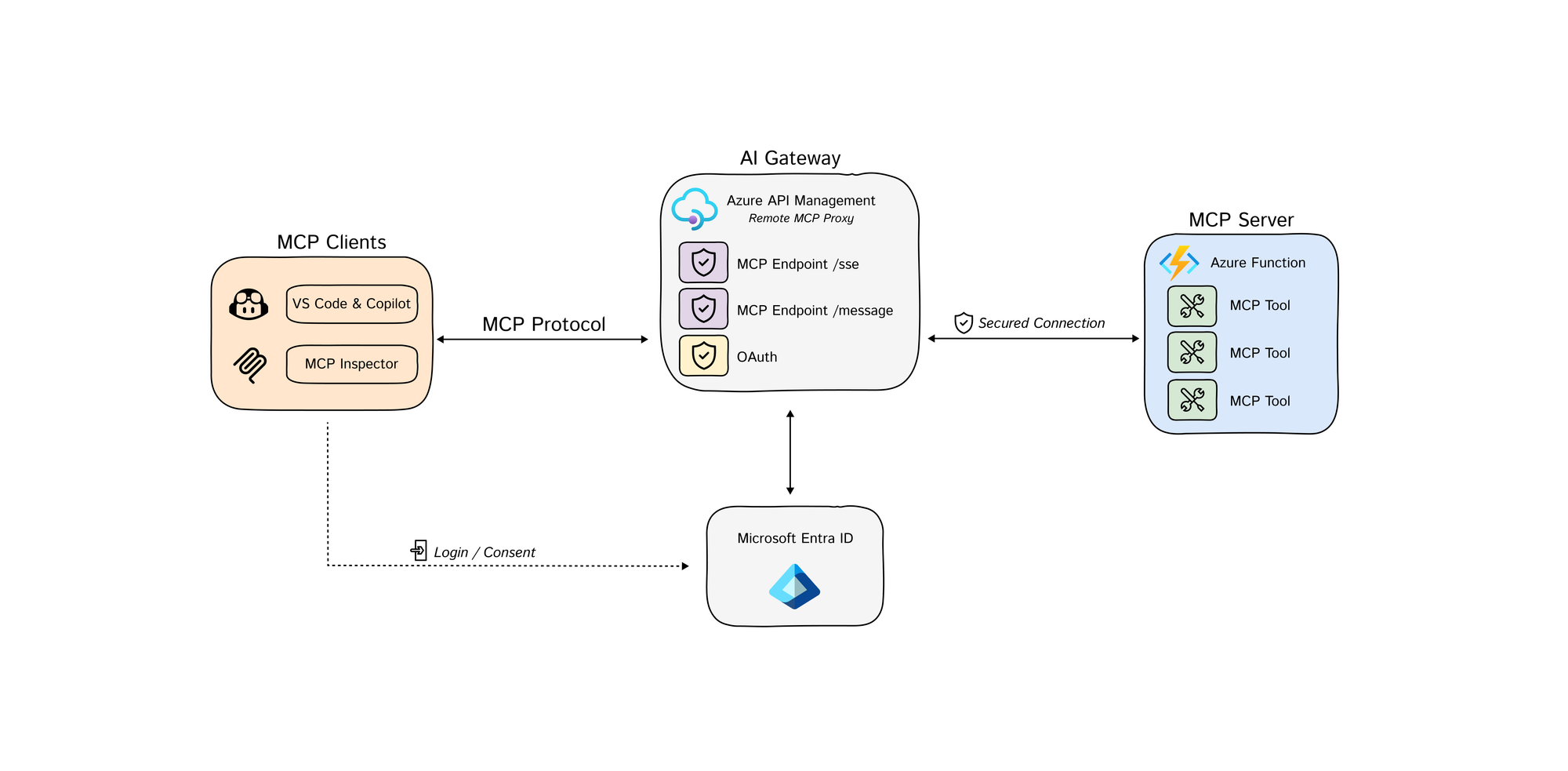
Most teams are still wiring MCP the wrong way. They let every client talk directly to every tool server, bolt on auth late, and discover too late that “agent integration” silently became a new control plane with no owner, no inventory, and no reliable audit trail.
Azure is now mature enough to do this properly, but the platform story is split across API Management, App Service or Functions authorization, Microsoft Foundry, and Microsoft Entra. The hard part is not learning each product in isolation. The hard part is deciding where identity, mediation, delegation, and logging must live so a tool call is still explainable after the fifth preview feature lands. [S1] [S2] [S3] [S4] [S5] [S6]
Status Check: What Is Actually Real on April 10, 2026
The purpose of this section is simple: separate current platform reality from architecture wishful thinking.
As of April 10, 2026, Microsoft’s MCP story is real, but it is not a single finished stack. The relevant documentation surfaces were updated on different schedules: API Management MCP guidance on November 18, 2025, App Service built-in MCP authorization on November 5, 2025, Azure Functions MCP hosting guidance on November 18, 2025, Microsoft Foundry AI gateway governance on February 27, 2026, and Microsoft Entra security for AI on April 3, 2026. Those dates matter because feature boundaries still move, especially around preview governance and identity flows. [S1] [S2] [S3] [S4] [S5] [S6]
| Surface | What it gives you today | The tradeoff you must accept |
|---|---|---|
| Azure API Management | Expose managed REST APIs as MCP servers and proxy existing remote MCP servers behind policies, auth, and rate limits | Great control surface, but feature parity is not full MCP parity: prompts are still a gap, and bad logging settings can break streaming. [S1] [S2] |
| App Service / Azure Functions | A practical way to host remote MCP servers with built-in authentication and Protected Resource Metadata (PRM) support | Server authorization is not tool authorization; you still need per-tool control and safe downstream delegation. [S3] [S4] |
| Microsoft Foundry AI gateway | A governed entry point for MCP tools with authentication, rate limits, IP restrictions, and audit logging | Still preview, supports only MCP tools, and does not log tool traces. [S5] |
| Microsoft Entra | Identity control plane for agents, unique identities, governance, and risk-based access controls | It solves ownership and policy, not server mediation by itself, and Agent ID is still preview. Many teams still need managed identities or service principals as the current-state production baseline. [S6] [S7] [S18] |
Raw comparison data from the NotebookLM research bundle is attached here: security-comparison.csv.
Useful GitHub Repos First
If you want code and architecture instead of marketing pages, start with these:
- Azure-Samples/remote-mcp-apim-functions-python: the most useful APIM-first MCP sample I found. It shows APIM acting as the AI gateway in front of an Azure Function MCP server, implements the MCP authorization flow, and includes both an architecture diagram and an authorization-flow GIF. [S10]
- Azure-Samples/AI-Gateway: the broader APIM AI Gateway lab repo. The useful parts here are the actual MCP notebooks, especially the MCP and MCP client authorization labs, plus the APIM policy and infra examples around them. [S11]
- microsoft/mcp-gateway: useful when APIM is not your end state or you want a Kubernetes-native control plane. It gives you
/adapters/{name}/mcpfor direct server routing,/mcpfor tool-router mode, session-aware routing, and Entra app-role authorization viarequiredRoles. [S12] - Azure/azure-mcp: useful mainly as a signpost. The repo is archived, and the Azure MCP server work moved into
microsoft/mcp. That matters if you are following old blog posts or stale setup guides. [S13]
If you remember only one thing, remember this: MCP on Azure is a composition problem, not a product-selection problem. The wrong composition gives you auth at the edge and chaos downstream. The right composition gives you explainable tool execution from the first pilot.
The Decision Model
This section exists to answer one question quickly: where should mediation live?
Use the following control-plane split:
- Microsoft Entra owns identity, ownership, risk posture, and lifecycle.
- API Management or Foundry AI gateway owns mediation, throttling, ingress policy, and coarse trust boundaries.
- The MCP server runtime owns tool semantics, per-tool authorization, and downstream delegation.
- Log Analytics / Application Insights / SOC own evidence, not just dashboards.
flowchart LR
    C["MCP Client<br/>Copilot / VS Code / Foundry Agent"] --> G["Gateway Layer<br/>APIM or Foundry AI Gateway"]
    C --> E["Microsoft Entra<br/>Client Identity + Consent"]
    G --> S["MCP Server Runtime<br/>App Service / Functions / Container Apps"]
    S --> D["Downstream Systems<br/>Graph / REST APIs / Data Stores"]
    S --> E
    G --> O["Audit + Metrics<br/>App Insights / Log Analytics"]
    S --> O
    O --> R["SRE / SOC / Cost Review"]
    G --> A["Approval Control<br/>for write or destructive tools"]
This model has one important tradeoff. A direct server pattern is usually lower latency and simpler for tightly scoped internal tools. A gateway pattern is usually safer and easier to govern once multiple teams, multiple clients, or multiple tool servers are involved. If you need cross-team reuse, policy consistency, or rate control, skipping the gateway is usually a false economy. [S1] [S2] [S5]
If you need a self-hosted reference implementation instead of APIM, microsoft/mcp-gateway is the clearest GitHub implementation I found. Its router model is concrete rather than aspirational: adapter routing lives at /adapters/{name}/mcp, tool routing lives at /mcp, and both rely on session-aware routing with basic Entra app-role authorization. [S12]
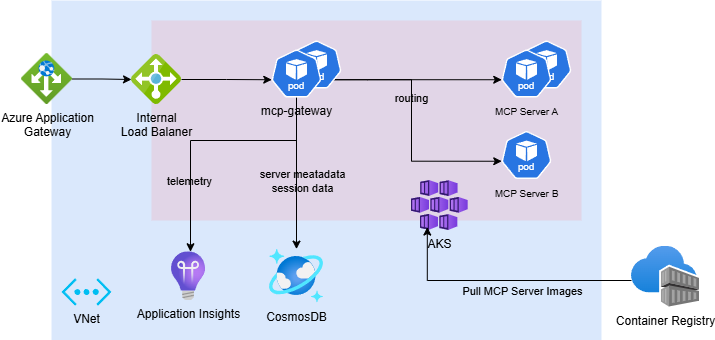
GitHub reference architecture from microsoft/mcp-gateway. It is useful because it makes the self-hosted gateway split concrete: ingress, router, session metadata, runtime pods, and telemetry all live as distinct components rather than one black box. Source: S12.
Pattern 1: Put REST APIs Behind API Management, Not Directly in Front of Agents
The purpose of this section is to show where Azure API Management earns its place.
If the backend system already speaks HTTP cleanly, API Management is the most practical first stop. Microsoft now documents two distinct MCP patterns there:
- Expose a managed REST API as an MCP server using APIM’s built-in AI gateway.
- Expose and govern an existing remote MCP server hosted somewhere else. [S1] [S2]

GitHub sample architecture from Azure-Samples/remote-mcp-apim-functions-python. This is the most useful visual reference I found for the APIM-fronted remote MCP pattern. Source: S10.
That split matters operationally.
- Managed REST APIs exposed through APIM currently support tools, but not MCP resources or prompts. [S1]
- Existing remote MCP servers proxied through APIM support tools and resources, but still not prompts. They also need to conform to MCP version
2025-06-18or later and use Streamable HTTP or SSE. [S2] - APIM policy evaluation gives you a single place to enforce rate limits, headers, auth forwarding, IP controls, and client-specific routing. [S1] [S2]
Why are prompts still missing here? This is an inference from the product shape, not an explicit Microsoft sentence: APIM’s managed REST path is built around exposing selected API operations as MCP tools, so the control plane is operation-centric rather than a general-purpose MCP object model. That explains why tools map cleanly, resources are partial, and prompts remain unsupported on the APIM-managed REST path. [S1]
The healthy ingress path should look like this:
sequenceDiagram
    autonumber
    participant Client as MCP Client
    participant Entra as Microsoft Entra
    participant APIM as Azure API Management
    participant Server as MCP Server
    participant API as Downstream API

    Client->>Entra: Acquire token for MCP gateway audience
    Entra-->>Client: Access token
    Client->>APIM: MCP request + Mcp-Session-Id
    APIM->>APIM: Validate Entra token
    APIM->>APIM: Rate limit by session
    Note over APIM: buffer-response=false<br/>frontend payload logging=0
    APIM->>Server: Forward streamable request
    Server->>Server: Authorize tool
    opt Read-only tool needs backend data
        Server->>API: Call downstream API with scoped identity
        API-->>Server: Result payload
    end
    Server-->>APIM: MCP response stream
    APIM-->>Client: Stream response
The most useful production detail in the docs is not glamorous: global response-body logging can break MCP streaming. Microsoft explicitly warns that enabling payload logging at the global scope can interfere with MCP behavior, and recommends setting frontend response payload bytes to 0 globally, then enabling payload capture only selectively where you really need it. That is both a reliability control and a data-leakage control. [S1] [S2]
Here is the APIM pattern that actually matters in production: validate the Entra token first, rate-limit tool calls second, and configure backend forwarding so SSE is not buffered.
<policies>
  <inbound>
    <base />
    <validate-azure-ad-token tenant-id="{{aad-tenant-id}}" output-token-variable-name="jwt">
      <audiences>
        <audience>api://{{mcp-gateway-app-id}}</audience>
      </audiences>
    </validate-azure-ad-token>

    <!-- Rate limit tool calls by Mcp-Session-Id header -->
    <set-variable name="body" value="@(context.Request.Body.As<string>(preserveContent: true))" />
    <choose>
      <when condition="@(
          Newtonsoft.Json.Linq.JObject.Parse((string)context.Variables[\"body\"])[\"method\"] != null
          && Newtonsoft.Json.Linq.JObject.Parse((string)context.Variables[\"body\"])[\"method\"].ToString() == \"tools/call\"
      )">
        <rate-limit-by-key
          calls="1"
          renewal-period="60"
          counter-key="@(context.Request.Headers.GetValueOrDefault(\"Mcp-Session-Id\", \"unknown\"))" />
      </when>
    </choose>
  </inbound>

  <backend>
    <!-- Required for SSE-style MCP transports -->
    <forward-request timeout="120" fail-on-error-status-code="true" buffer-response="false" />
  </backend>

  <outbound>
    <base />
  </outbound>
</policies>
The token validation step is the real ingress boundary. The rate limit is the anti-abuse control layered on top of it. Together they give you a defensible gateway posture instead of auth-by-convention. [S2] [S14]
There is also a transport reality that many “APIM + SSE” demos quietly skip. Microsoft’s SSE guidance says long-running HTTP connections are supported in the classic and v2 APIM tiers, but not in the Consumption tier. It also says you need a keepalive strategy if a connection can sit idle for four minutes or longer, because APIM infrastructure inherits Azure Load Balancer’s idle timeout, and it recommends buffer-response="false" on forward-request so events relay immediately. Separately, the forward-request policy reference warns that timeout values above 240 seconds might not be honored because underlying network infrastructure can still drop idle connections. [S15] [S16]
Failure mode: teams often put APIM in front of MCP and assume they are done. They are not. APIM is excellent at ingress control, but it cannot compensate for an MCP server that still forwards broad tokens downstream, exposes destructive tools without approval, or logs sensitive payloads internally.
Mitigation: use APIM as the first control boundary, not the only one.
Pattern 2: Treat Server Authorization and Downstream Delegation as Two Different Problems
This section matters because many Azure MCP designs still confuse “user authenticated to server” with “server safely authorized to act on downstream systems.”
App Service and Azure Functions now document built-in MCP server authorization with PRM support. That is useful because it gives compliant clients enough metadata to discover how to authenticate, and it removes a lot of custom OAuth plumbing for common cases. [S3] [S4]
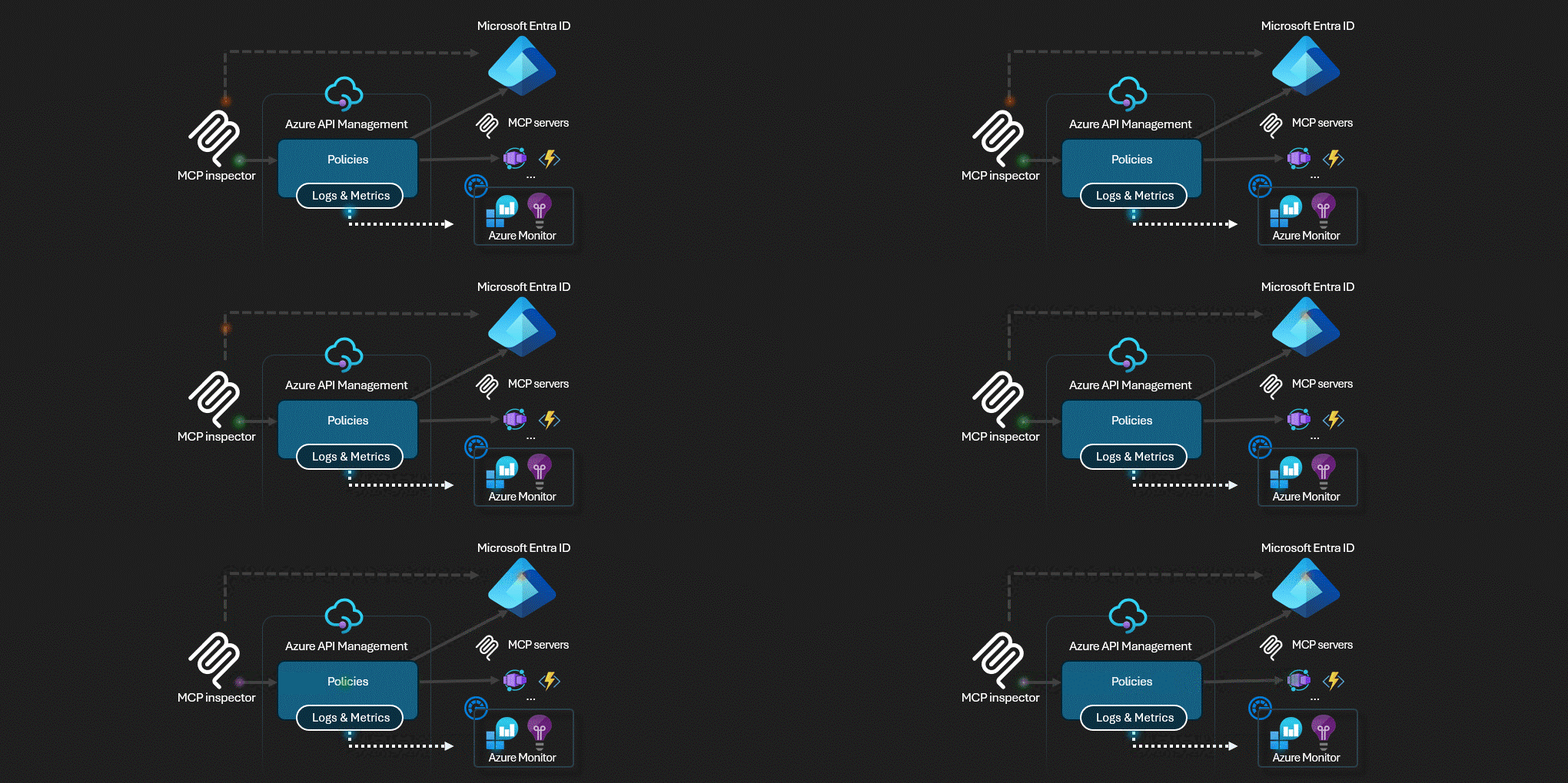
GitHub sample auth flow from Azure-Samples/remote-mcp-apim-functions-python. This is more useful than a doc screenshot because it shows the actual third-party authorization sequence the sample implements. Source: S10.
The important operational details are precise:
- App Service Authentication controls access to the MCP server, not granular access to specific tools. [S3]
- PRM support is configured with
WEBSITE_AUTH_PRM_DEFAULT_WITH_SCOPES. [S3] [S4] - Microsoft Entra ID does not support dynamic client registration in this flow, so known clients often need to be preauthorized. [S3]
- Azure Functions guidance explicitly distinguishes built-in server authentication from key-based authentication, and recommends the built-in route for stronger security. [S4]
- Microsoft warns against token pass-through. The token presented to access the MCP server is not a downstream resource token. If you need downstream access, use On-Behalf-Of or another explicit delegation mechanism. [S3]
The minimum configuration shape looks like this:
# Publish Protected Resource Metadata scopes for the MCP server
WEBSITE_AUTH_PRM_DEFAULT_WITH_SCOPES=api://<server-app-id>/user_impersonation

# If built-in auth is enabled, disable host-key auth at the function entry point
AzureFunctionsJobHost__customHandler__http__DefaultAuthorizationLevel=Anonymous
And the runtime rule is even more important than the config:
- Validate the client token for your MCP server audience.
- Authorize tool access in the server or gateway.
- Exchange for a new downstream token when needed.
- Never forward the original server token to Graph, a line-of-business API, or another resource. [S3] [S4] [S9]
The Microsoft ISE team published the most practical field note here in February 2026: if you want sub-second internal tool calls, you can keep the authorization logic close to the runtime, cache JWKS for token validation, and use OBO only when the tool truly needs downstream user-context access. That is a reasonable low-latency pattern, but it comes with a tradeoff: you give up some of the policy centralization you would get from APIM-first mediation. [S9]
The flow below shows both the happy path and the branch that usually breaks pilots:
sequenceDiagram
    autonumber
    participant Client as MCP Client
    participant Server as MCP Server
    participant Entra as Microsoft Entra
    participant API as Downstream API

    Client->>Server: Call protected MCP tool
    Server->>Server: Validate audience and authorize tool
    Server->>Entra: OBO exchange for downstream scope
    alt Consent and Conditional Access requirements already satisfied
        Entra-->>Server: Downstream access token
        Server->>API: Call downstream API
        API-->>Server: Result
        Server-->>Client: Tool response
    else Claims challenge or missing consent
        Entra-->>Server: interaction_required / claims challenge
        Note over Server,Entra: Headless middle tiers cannot complete MFA,<br/>device claims, or other interactive CA steps
        Server-->>Client: Deterministic failure or re-auth instruction
    end
OBO is where many “secure on paper” designs fail in production. The Microsoft identity platform documentation is explicit on two points that architects should not treat as footnotes:
- the middle tier has no interactive UI, so consent for downstream APIs must be established up front,
- and the middle tier cannot satisfy Conditional Access step-up requirements such as MFA, sign-in frequency, or device-based claims by itself. [S17]
In practice, that means OBO needs real design work:
- App registrations, downstream scopes, and admin consent must be clean before the first production rollout.
- The MCP server needs a deterministic way to surface or fail claims challenges instead of retrying blindly.
- OBO should be reserved for tools that genuinely require user-context access; service or managed identities are safer for system-context operations. [S9] [S17]
Failure mode: the common bad design is “the user authenticated successfully, so the server can reuse that token everywhere.”
Mitigation: split authentication from delegation. Server access proves who reached the MCP surface. OBO proves what downstream access is allowed only when consent, claims-challenge handling, and app registration hygiene are designed correctly.
Pattern 3: Use Foundry AI Gateway When the Agent Team Already Lives in Foundry
This section is about where Foundry helps and where it currently does not.
Microsoft Foundry now documents an AI gateway preview that can route MCP traffic through a governed entry point, applying authentication, rate limits, IP restrictions, and audit logging without modifying MCP servers or agent code. That is a powerful pattern when the agent estate is already centered in Foundry and the goal is to standardize how teams consume external tools. [S5]
This is the cleanest way to describe its value:
- It gives agent teams a single governed ingress for MCP tools. [S5]
- It helps central teams enforce policy without asking every server owner to rebuild auth or throttling. [S5]
- It is especially useful when multiple agents need to share the same external tool surface. [S5]
But the preview limitations are not minor footnotes:
- AI gateways currently support only MCP tools.
- They do not log tool traces.
- Routing is applied only when the tool is created; existing tools are not automatically mediated.
- API Management policies are applied in the Azure portal, not the Foundry portal. [S5]
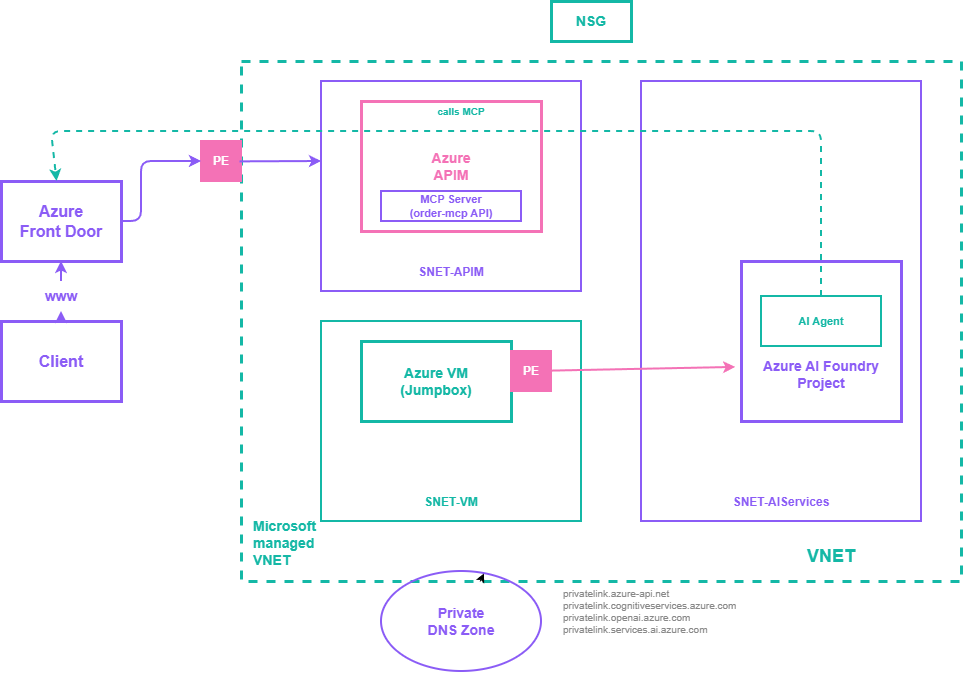
Private MCP reference architecture from Azure-Samples/AI-Gateway. This is useful because it shows the network boundary problem that Foundry-centric teams eventually hit: agent, gateway, and MCP ingress must still be composed with private endpoints and DNS, not just portal toggles. Source: S11.
That means Foundry AI gateway is not yet a full replacement for direct server instrumentation or APIM. If you adopt it, you still need server-side telemetry and you still need a clear ownership model for tool inventories.
Tradeoff: Foundry AI gateway gives cleaner agent-side governance, but today it gives less diagnostic depth than many teams assume.
Failure mode: teams see “audit logging” and assume they now have complete per-tool execution evidence.
Mitigation: keep gateway logs, but instrument the server runtime independently and store the events in a central workspace. Foundry’s preview gateway should be treated as an enforcement surface, not yet your forensic system of record. [S5] [S7]
Pattern 4: Make Microsoft Entra the Identity Control Plane, or Accept Agent Sprawl
The point of this section is blunt: if every MCP-connected workload does not have a known owner, scope, and lifecycle, you are not scaling agents, you are scaling unknown risk.
Microsoft Entra’s security-for-AI guidance is the clearest current statement of the problem. It explicitly calls out agent sprawl as the uncontrolled expansion of agents without adequate visibility, management, or lifecycle controls, and ties security for AI workloads to identity-based controls across human and nonhuman identities. [S6]
The Cloud Adoption Framework guidance is even more operational. It recommends:
- unique identities per agent,
- centralized logging,
- cost allocation by agent or use case,
- least-privilege access,
- restrictions to trusted MCP servers,
- ownership and approval accountability,
- SOC integration for AI-related alerts. [S7]
That is the right foundation for Azure MCP deployments because MCP multiplies connectivity. Once tools become discoverable, a weak identity model becomes a multiplier for blast radius.
My practical rule is:
- Every server gets an owner.
- Every agent gets an identity.
- Every tool gets a classification: read-only, write, or destructive.
- Every destructive or high-impact tool gets an approval model.
- Every production agent gets cost tags and an expiry or review date.
Preview warning: Microsoft Entra Agent ID is currently in preview. Treat it as the strategic end-state for agent-native identity, sponsorship, and blueprint-based governance, not as a mandatory day-one dependency for every production rollout. If you need a fully supported baseline today, start with managed identities or service principals plus ownership, expiry, and access reviews, then adopt Agent ID when its support model matches your environment. [S6] [S18]
If you cannot answer “who owns this tool server?” or “which agent can call it?” in under five minutes, do not add more MCP endpoints.
Risk Register: The Failures That Actually Hurt
This section exists because security guidance is useless if it stays generic.
| Failure mode | Why it happens | What to enforce |
|---|---|---|
| Token passthrough | Server token is incorrectly reused for downstream resources | Use OBO or explicit delegation; never forward the server token downstream. [S3] [S9] |
| OBO claims-challenge dead-end | Downstream API requires MFA, sign-in frequency, or device claims that a headless middle tier can’t satisfy | Pre-consent downstream scopes, detect claims challenges, and route the user back through an interactive path or use managed identity where user context is not required. [S17] |
| Streaming breaks or sensitive bodies leak | Response-body logging is enabled globally in APIM or inspected in policies | Set global frontend response payload logging to 0; capture payloads only at narrow scopes when justified. [S1] [S2] |
| Over-broad tool permissions | Tool and server auth are treated as one problem | Keep tool-level authorization in server or gateway; use least-privilege service identities. [S3] [S7] |
| OAuth abuse in proxy flows | Redirect URIs, consent state, or cookies are not tightly bound | Enforce exact redirect_uri matching, state validation, and client-bound consent cookies. [S8] |
| Agent sprawl | Teams ship agents without identity inventory, owner, or expiry | Use Entra-backed identity governance, centralized inventory, and access reviews. [S6] [S7] |
| Unsafe external tool exposure | Any external server is accepted as MCP-compatible and therefore trusted | Restrict to approved MCP servers, approved transports, approved auth methods, and approved network paths. [S2] [S7] [S8] |
| Feature mismatch across Azure surfaces | Teams assume APIM, Foundry, and hosted server runtimes all support the same MCP constructs | Design explicitly for today’s support matrix: tools everywhere, resources selectively, prompts not consistently supported. [S1] [S2] [S5] |
The Model Context Protocol security guidance is useful here because it is specific where many enterprise security checklists stay vague. It requires exact redirect URI matching, strict state validation, and client-bound consent decisions. That is not bureaucracy. That is the difference between a secure delegated flow and a confused-deputy incident. [S8]
Observability and SLOs: The Minimum Viable Evidence Model
You do not have observability if a bad tool call still ends with three teams debating whose logs are incomplete.
Microsoft’s current Azure guidance is explicit that agent behavior must be auditable and that centralized logging, cost visibility, and ownership tracking are mandatory if you want to operate agents safely at scale. The bad news is that no single Azure MCP surface gives you everything automatically. Foundry gateway does not currently log tool traces; APIM gives powerful ingress logging but can break streaming if configured badly; server runtimes still need their own telemetry contract. [S2] [S5] [S7]
For every production MCP tool call, log at least:
timestampagent_idserver_idtool_namemcp_session_idcaller_identitydownstream_resourceauthorization_modeapproval_requiredapproval_resultlatency_msresult_code
Capture Mcp-Session-Id and your chosen Agent-Id field into custom dimensions at both the gateway and the server runtime. If you do not standardize those correlation keys, incident review becomes manual archaeology.
I would treat the following as a sane starting SLO set:
| Signal | Starting target |
|---|---|
| Auth success rate | >= 99.9% |
| Read-only tool call p95 latency | < 1500 ms intra-region |
| Write tool call p95 latency | < 4000 ms excluding human approval |
| Unknown or unowned production agents | 0 |
| Global APIM response-body logging on MCP endpoints | 0 |
| Approval bypasses for destructive tools | 0 |
Example KQL for a first operational view that correlates gateway traffic with session and identity context:
let gateway = requests
| where url contains "/mcp"
| extend mcp_session_id = coalesce(
    tostring(customDimensions["Mcp-Session-Id"]),
    tostring(customDimensions["mcp_session_id"]))
| extend agent_id = coalesce(
    tostring(customDimensions["Agent-Id"]),
    tostring(customDimensions["agent_id"]),
    tostring(customDimensions["azp"]),
    tostring(customDimensions["appid"]))
| project gateway_ts = timestamp, operation_Id, operation_Name, success, duration, resultCode, mcp_session_id, agent_id;
let server = traces
| extend mcp_session_id = coalesce(
    tostring(customDimensions["Mcp-Session-Id"]),
    tostring(customDimensions["mcp_session_id"]))
| extend caller_identity = coalesce(
    tostring(customDimensions["caller_identity"]),
    tostring(customDimensions["oid"]),
    tostring(customDimensions["sub"]))
| extend tool_name = tostring(customDimensions["tool_name"])
| where isnotempty(mcp_session_id) or isnotempty(tool_name)
| project operation_Id, server_session_id = mcp_session_id, caller_identity, tool_name;
gateway
| join kind=leftouter server on operation_Id
| extend correlated_session_id = coalesce(mcp_session_id, server_session_id)
| summarize
    calls = count(),
    failures = countif(success == false),
    p95_duration = percentile(duration, 95),
    tools = make_set(tool_name, 10),
    callers = make_set(caller_identity, 10)
    by agent_id, correlated_session_id, bin(gateway_ts, 5m)
| extend failure_rate = todouble(failures) / todouble(calls)
| order by gateway_ts desc
If your telemetry schema differs, change the table names. The point is not the exact query. The point is that gateway events, server events, and identity context must be joinable.
A Practical Rollout Plan
This section is about reducing regret, not accelerating PowerPoint.
Checkpoint 1: Inventory Before Exposure
Start by classifying candidate tools into three classes:
- read-only,
- write,
- destructive.
Do not put write or destructive tools into the same pilot wave as read-only tools. The tradeoff is obvious: one combined wave looks faster, but it destroys your ability to learn safely.
Checkpoint 2: Pilot One Read-Only Path
Pick one thin workflow and make it boring:
- one MCP server,
- one client type,
- one gateway pattern,
- one downstream data source,
- one Log Analytics workspace,
- one clear owner.
Your exit criteria should be operational, not promotional:
- auth works consistently,
- tool latency is measurable,
- logs are correlated,
- costs are attributable,
- there is no hidden payload logging,
- the owner can explain the exact access path.
Checkpoint 3: Add One Write Tool With Approval
Once read-only is stable, add a single write path behind approvals. Do not scale read-write tooling before you prove:
sequenceDiagram
    autonumber
    participant Agent as Agent / MCP Client
    participant Gateway as APIM or Foundry Gateway
    participant Server as MCP Server
    participant Approval as Approval Service
    participant System as Write Target

    Agent->>Gateway: Request write or destructive tool
    Gateway->>Server: Forward request
    Server->>Server: Classify tool as write/destructive
    Server->>Approval: Submit approval payload
    alt Approved
        Approval-->>Server: Approval granted + approver identity
        Server->>System: Execute with scoped identity
        System-->>Server: Success
        Server-->>Gateway: Audited tool result
        Gateway-->>Agent: Success response
    else Rejected or timed out
        Approval-->>Server: Denied / expired
        Server-->>Gateway: Blocked result
        Gateway-->>Agent: Approval required or denied
end- approval intent is explicit,
- the caller identity is preserved,
- downstream access uses OBO or a scoped service identity,
- rollback or compensating action is documented.
Checkpoint 4: Scale the Platform, Not the Exceptions
Only after the first three checkpoints pass should you centralize:
- reusable APIM policies,
- Foundry AI gateway onboarding,
- Entra agent inventory standards,
- cost tags,
- review and expiry workflows,
- incident response drills.
At that point, the program stops being “some teams are experimenting with MCP” and becomes “the organization has a governed tool-calling platform.”
What I Would Standardize Right Now
If I were setting Azure standards for MCP this week, I would publish these defaults:
- Gateway-first by default for shared or cross-team tools; direct server exposure only by exception.
- Gateway token validation is mandatory on protected MCP ingress by using
validate-azure-ad-tokenorvalidate-jwt; no auth-by-convention. - Managed identity or OBO only for downstream calls; no token passthrough.
- Unique agent identity, owner, and expiry for every production agent, with a preview-aware migration path to Agent ID.
- Read-only first wave for every new tool domain.
- Central Log Analytics workspace with per-agent cost tags and latency/error dashboards.
- No prompts-in-production assumption until support is explicit on the chosen Azure surface.
- No global response-body logging on MCP traffic in APIM.
That list is not theoretical. It is the shortest path I know to a system that survives security review, operations review, and a real incident.
Final Take
The biggest Azure MCP mistake in 2026 is not choosing the wrong product. It is pretending that product choice is the architecture.
API Management, App Service or Functions authorization, Foundry AI gateway, and Microsoft Entra each solve a different part of the problem. The durable design is the one that keeps those responsibilities separate:
- identity in Entra,
- mediation in APIM or Foundry,
- tool semantics and delegation in the server,
- evidence in centralized telemetry.
If you do that, MCP becomes a controlled enterprise interface. If you do not, it becomes a clever way to hide privileged automation behind natural language.
Source Mapping
| ID | Source | Why it is in this article |
|---|---|---|
| S1 | Expose REST API in API Management as an MCP server | APIM-managed REST-to-MCP pattern, support boundaries, and logging caveats |
| S2 | Expose and govern an existing MCP server | Existing remote MCP server mediation, transport/version requirements, and rate-limit policy shape |
| S3 | Configure built-in MCP server authorization (Preview) | PRM configuration, built-in auth semantics, and the warning against token passthrough |
| S4 | Tutorial: Host an MCP server on Azure Functions | Serverless MCP hosting, built-in auth posture, and Functions runtime specifics |
| S5 | Govern MCP tools by using an AI gateway (preview) | Foundry AI gateway capabilities, preview limitations, and policy placement |
| S6 | Microsoft Entra security for AI overview | Agent sprawl framing and identity-based security requirements for AI workloads |
| S7 | Governance and security for AI agents across the organization | Ownership, logging, cost visibility, and enterprise governance controls |
| S8 | Security Best Practices - Model Context Protocol | Redirect URI, state validation, consent binding, and MCP security controls outside Azure product docs |
| S9 | Building a Secure MCP Server with OAuth 2.1 and Azure AD: Lessons from the Field | Low-latency runtime auth patterns, JWKS caching, and OBO tradeoffs from field implementation |
| S10 | Azure-Samples/remote-mcp-apim-functions-python | APIM-fronted remote MCP sample, architecture diagram, and MCP client authorization flow |
| S11 | Azure-Samples/AI-Gateway | APIM AI Gateway lab collection with MCP, MCP client authorization, and agent/tool notebooks |
| S12 | microsoft/mcp-gateway | Kubernetes-native MCP gateway reference with /adapters, /tools, /mcp, session affinity, and role-based access |
| S13 | Azure/azure-mcp | Archived Azure MCP repo that now points readers to microsoft/mcp for the active Azure MCP server codebase |
| S14 | Validate Microsoft Entra token policy in API Management | APIM Entra token validation policy shape and scope-specific usage notes |
| S15 | Configure API for server-sent events in API Management | SSE tier support, keepalive requirement, buffer-response=\"false\", and the non-support of Consumption tier for long-running connections |
| S16 | Forward request policy in API Management | Backend timeout controls and the warning that values above 240 seconds might not be honored |
| S17 | Microsoft identity platform and OAuth 2.0 On-Behalf-Of flow | Official OBO flow limits, upfront consent requirement, and Conditional Access claims-challenge constraints |
| S18 | Agent identities in Microsoft Entra Agent ID | Agent ID preview status, sponsor/blueprint model, and the distinction from standard workload identities |