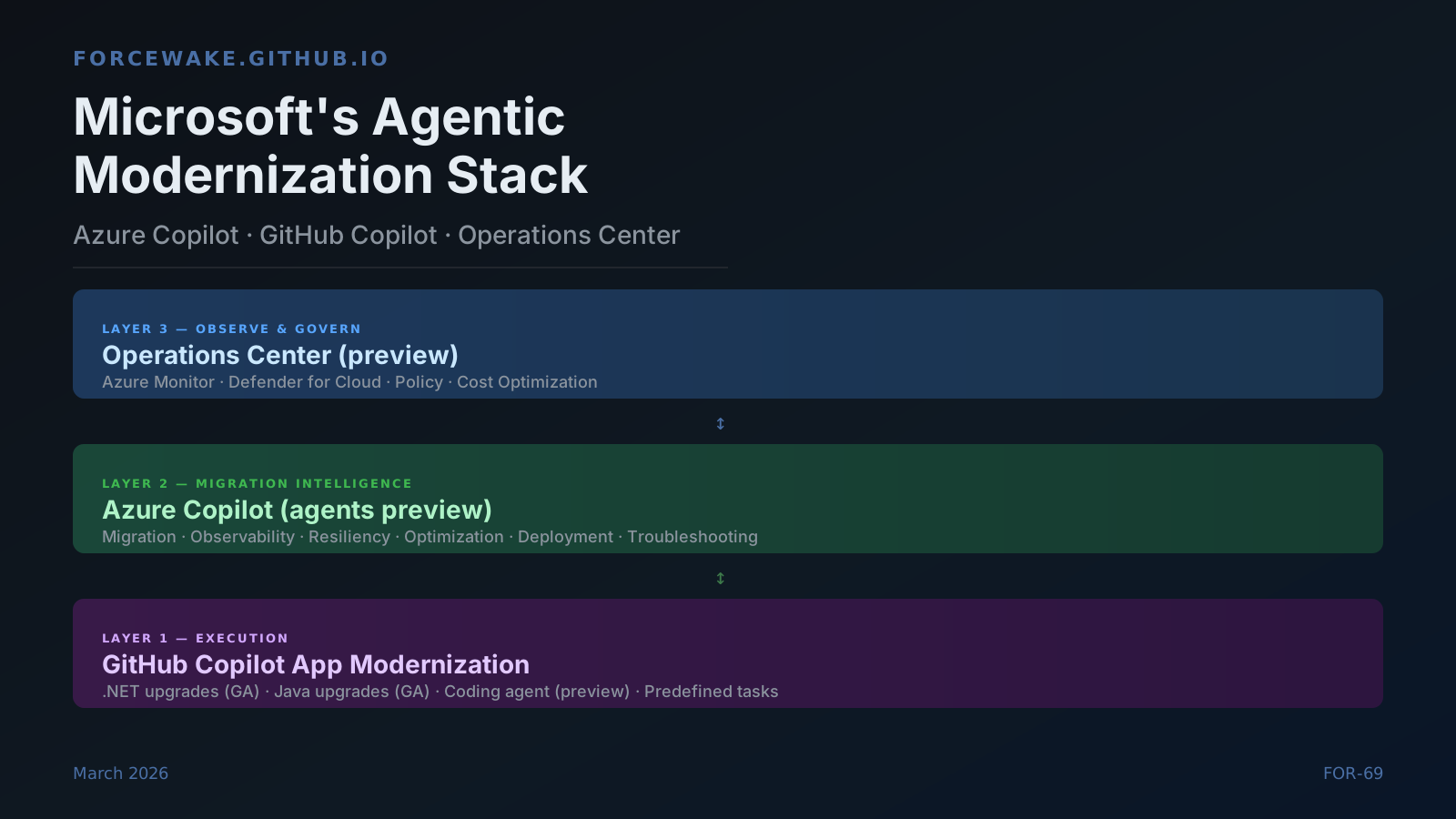
Microsoft’s biggest AI play in 2026 is not a new model, a new IDE, or a new assistant. It is an emerging connected modernization control plane: Azure Copilot owns migration and operational intelligence, GitHub Copilot owns application transformation execution, and Operations Center gives enterprises a single surface to observe, steer, and govern the resulting cloud estate.
Each layer is individually useful. Together they describe something more interesting: a vertical stack that can convert a multi-year legacy migration programme into a continuous, agentic workflow — with humans kept in the decision seat rather than removed from it.
This piece is a technical analysis of that stack. It examines what is documented and generally available, what is in public preview with real limitations, and where Microsoft is pulling together capabilities that were previously separate products with no handshake between them.
The Three-Layer Model
Before digging into each layer, it helps to state the architecture plainly.
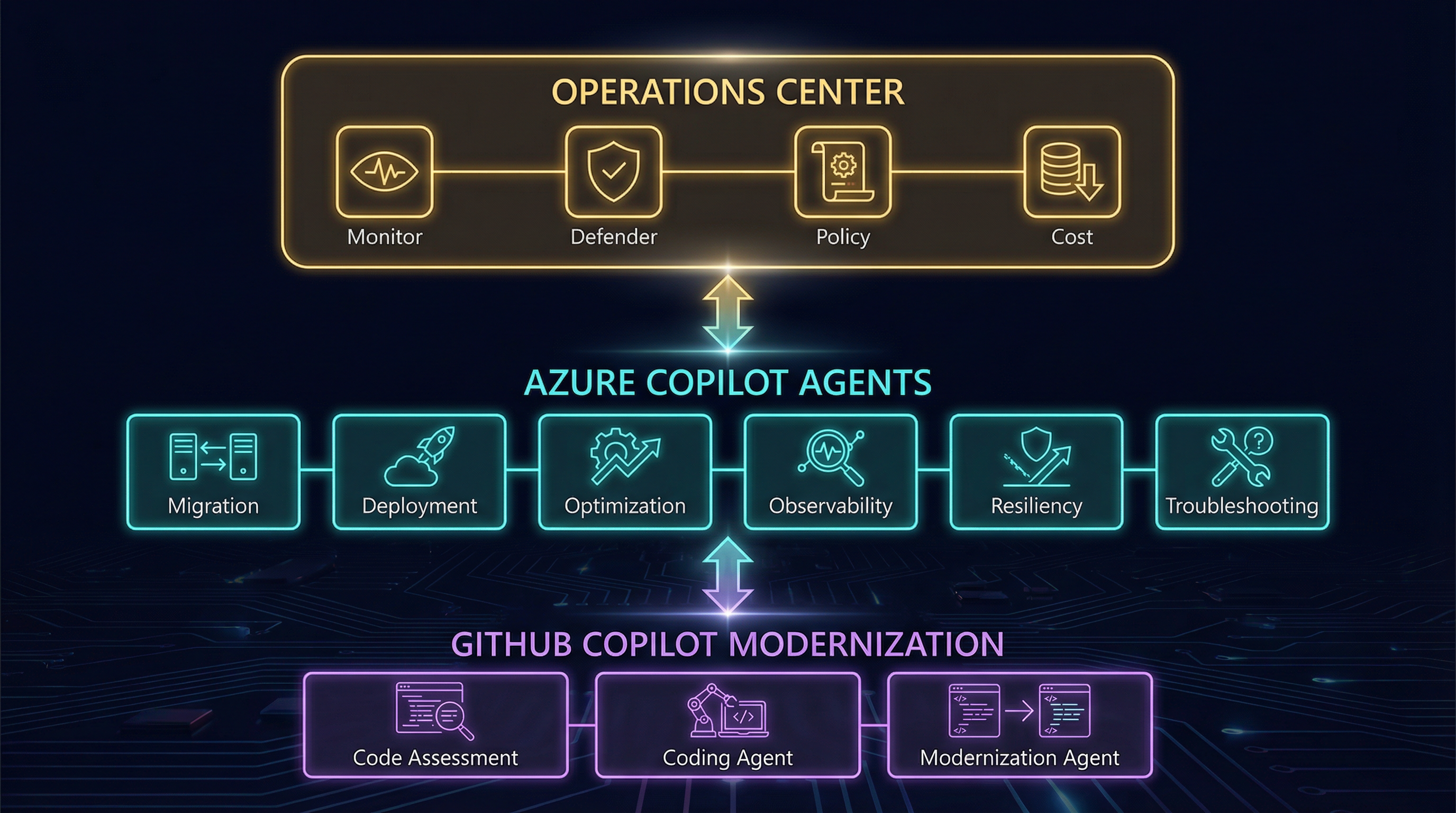
Three layers, one system: GitHub Copilot handles code assessment and transformation, Azure Copilot agents add migration and cloud-operations intelligence, and Operations Center becomes the unified governance surface.
The handoff between layers is the interesting engineering story here. Azure Copilot ingests code assessment reports produced by GitHub Copilot modernization, uses them to inform Azure Migrate readiness scoring, and returns target environment recommendations back to the developer. It is a bi-directional information channel between the infrastructure team and the application team — a gap that traditionally took weeks to close manually.
Layer 1: Azure Copilot as Migration and Operational Intelligence
What Azure Copilot actually is
Azure Copilot is not the general-purpose Copilot chat that appears across Microsoft 365. It is a purpose-built agentic interface — announced at Microsoft Ignite 2025 — that orchestrates six specialist agents across the cloud management lifecycle:
| Agent | Function |
|---|---|
| Migration | Discovery, assessment, business case generation, wave planning |
| Deployment | Infrastructure-as-code generation, landing zone setup |
| Optimization | Cost, performance, and carbon recommendations |
| Observability | Root-cause investigation across metrics/logs/traces |
| Resiliency | Business continuity, backup, site recovery guidance |
| Troubleshooting | Support-case resolution and known-issue matching |
All six were announced in gated preview at Ignite 2025. The migration agent moved to public preview in March 2026 (source).
Access is tenant-scoped. For most Azure tenants, the request to access Agents preview is made automatically, but rollout is gradual. Administrators can confirm access via the Azure portal; all users in the tenant who can reach Azure Copilot get the agents automatically once approved (source).
What the migration agent can and cannot do
The migration agent operates within Azure Migrate. Given a connected environment, it can:
- Ingest RVTools exports to discover VMware workloads
- Summarise discovered inventory from an existing appliance deployment
- Generate business cases comparing lift-and-shift vs PaaS modernisation
- Tag servers and databases with application attributes
- Produce readiness summaries for tagged workload groups
- Generate platform landing zone configurations
- Compare ROI between migration strategies
What it cannot do as of March 2026:
“While Azure Copilot can provide guidance, create plans, and apply tags, it can’t perform actual migration actions such as server replication on your behalf.” — Microsoft Learn: Migration capabilities in Agents preview
Server replication, failover, and interactions that require Azure Backup or Azure Site Recovery are not yet supported. The agent’s value is decision acceleration and plan generation, not automated execution of infra-level migrations. That boundary matters for enterprise teams who need to communicate clearly to stakeholders about what “agentic migration” actually means.
Supported workload types currently: VMware end-to-end; Hyper-V and physical servers with some limitations; databases via Azure Migrate-connected discovery.
The code assessment handshake
The more technically interesting capability is the information bridge to GitHub Copilot. From the March 2026 blog post (Jeremy Winter, Azure Blog):
“GitHub Copilot modernization capabilities scan application code to produce detailed code assessment reports, while Azure Copilot’s migration agent ingests those reports to surface code-level issues, warnings, and insights. This integration allows Azure Copilot to incorporate real code analysis when assessing readiness and recommending the right Azure target.”
Before this integration, infrastructure teams assessed workloads at the VM level and application teams assessed code independently. The result was consistently mismatched: a VM might look “ready” for migration while the application running on it had 30 unresolved compatibility issues. The assessment handshake closes that gap — at least in theory. The documentation does not yet specify what format the assessment report uses or exactly which Azure Migrate API receives it, so the claim should be treated as directionally accurate but partially opaque.
Layer 2: GitHub Copilot as Modernization Execution Layer
What is generally available
GitHub Copilot app modernization has been shipping since autumn 2025. The following capabilities are generally available as of March 2026:
- .NET automated upgrades: Framework and runtime upgrades, custom upgrade instructions, IDE integration in VS Code and Visual Studio
- Java automated upgrades: JDK and Spring Boot version upgrades, Gradle and Maven project support, IntelliJ and VS Code integration
These are not chat suggestions. The modernization extension runs a structured pipeline: generates an upgrade plan, performs code remediation, builds the project, checks for CVEs, and produces a progress report. The developer reviews and accepts the diff.
The coding agent (preview)
The coding agent mode — using GitHub Copilot’s new agent infrastructure — is in public preview. When configured via MCP, a developer can open the Agents panel, enter a natural-language prompt, and Copilot will open a pull request in the background and add the developer as reviewer when complete.
Configuration requires adding the @microsoft/github-copilot-app-modernization-mcp-server to the
repository’s Copilot coding agent MCP configuration:
{
  "mcpServers": {
    "app-modernization": {
      "type": "local",
      "command": "npx",
      "tools": ["*"],
      "args": ["-y", "@microsoft/github-copilot-app-modernization-mcp-server"]
    }
  }
}
This requires a GitHub Copilot Pro, Pro+, Business, or Enterprise plan. It is not available in repositories owned by managed user accounts or where coding agent has been explicitly disabled (source).
The three supported coding-agent scenarios for Java are:
- Upgrade to a newer runtime or framework:
Upgrade this project to JDK 21 and Spring Boot 3.5 - Apply a predefined migration task:
Run migration task for scenario Migrate Cassandra integration to Azure SDK using Managed Identity - Deploy to Azure:
Deploy this application to Azure
The modernization agent (preview)
The modernization agent — announced March 2026 — is an orchestrator layer above the coding agent. Where the coding agent handles one application, the modernization agent runs multiple code assessments, builds unique modernization plans per application, and executes upgrades in parallel. This is the component that closes the gap between handling one migrating application and handling a portfolio. It is in public preview.
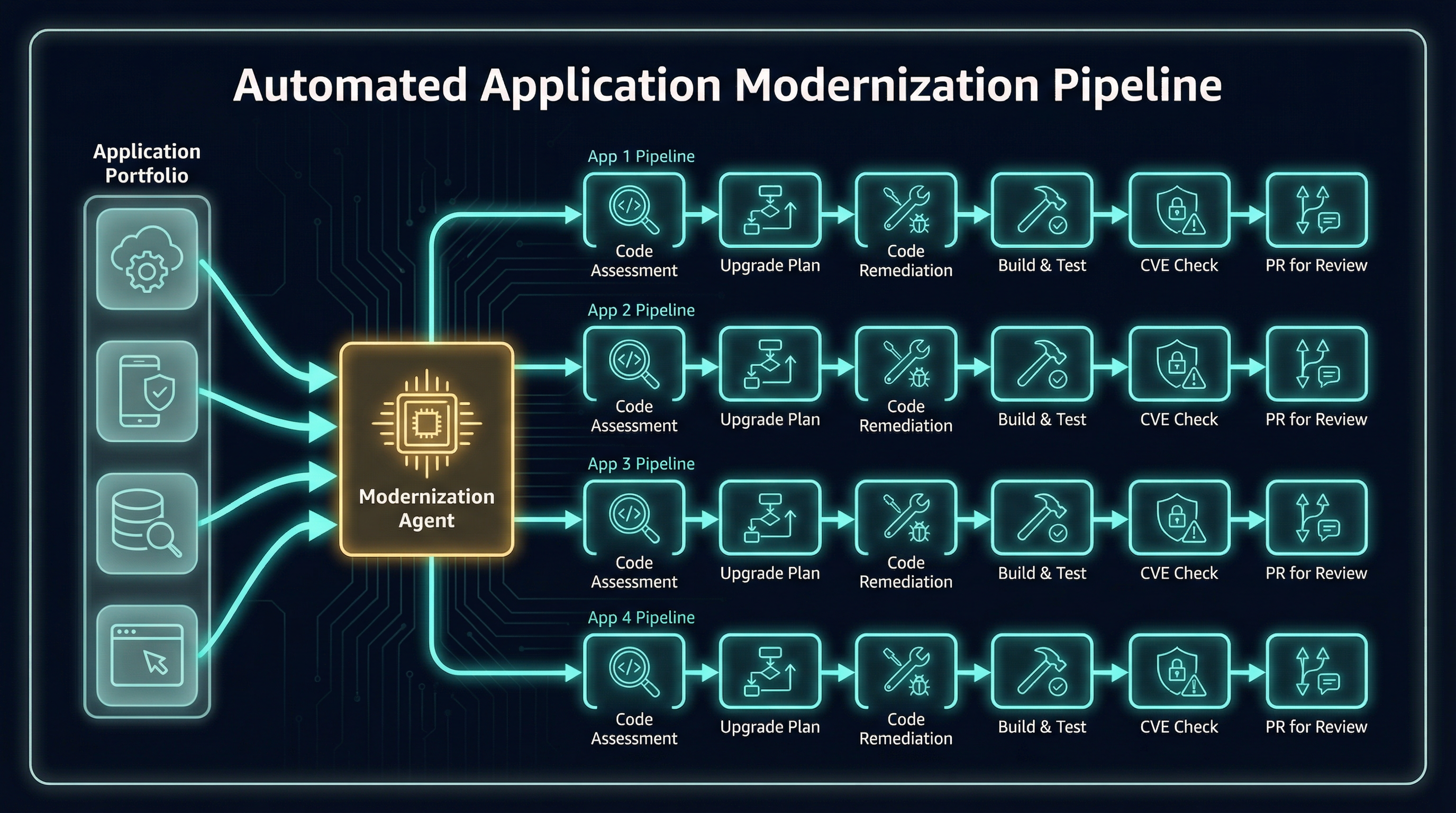
The modernization agent story only becomes interesting at portfolio scale: one orchestrator fans out into many application-specific upgrade plans, validations, CVE checks, and reviewable pull requests.
Layer 3: Operations Center as the Unifying Surface
What Operations Center is
Operations Center is a unified portal experience announced alongside the Agents preview. It consolidates what was previously scattered across Azure Monitor, Defender for Cloud, Business Continuity Center, Azure Policy, Update Manager, Change Tracking, and Cost Management into a single surface with five management menus:
| Menu | Services consolidated |
|---|---|
| Observability | Azure Monitor, Service Health |
| Security | Defender for Cloud |
| Resiliency | Business Continuity Center, Backup, Site Recovery |
| Configuration | Policy, Machine Configuration, Update Manager, Change Tracking |
| Optimization | Cost Optimization, Carbon Emissions |
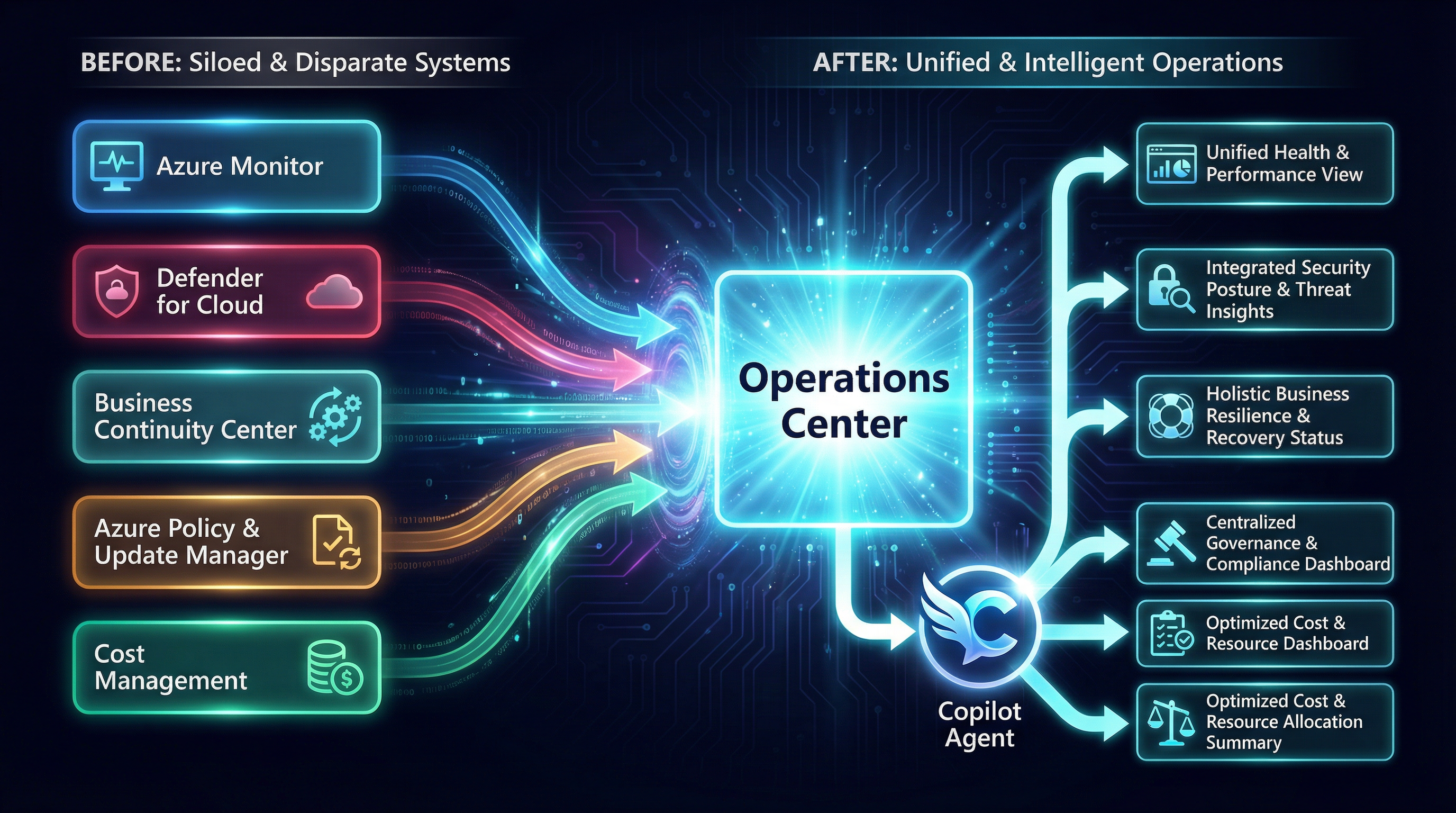
This is the core Operations Center move: Microsoft is collapsing scattered operational surfaces into one menu-driven control plane, then attaching Copilot-guided reasoning and recommendations to that unified view.
Access to Operations Center is part of Agents preview in Azure Copilot — it is not a standalone product. The top-level overview page surfaces critical actions and recommendations across all five menus, with each menu including an Azure Advisor recommendation panel (source).
One capability unique to Operations Center is machine enrollment: a streamlined onboarding workflow that configures subscriptions to automatically enroll new VMs and Arc-enabled servers into monitoring, security, and management services. This is not available elsewhere in the Azure portal.
The observability agent
Within the Operations Center / Azure Copilot observability surface, the observability agent runs structured, interactive root-cause investigations from alert entry points. It:
- Correlates metrics, logs, alerts, resource health signals, and recent-release signals
- Detects anomalies across multiple data sources simultaneously
- Presents its reasoning inline so the operator can follow and challenge the logic
- Saves investigation state as an Azure Monitor Issue for future reference
The agent is available today in 40+ Azure regions (source).
Key limitations to note:
- Investigation results are retained for 48 hours unless saved as an issue
- Customer Managed Keys (CMK) are not supported for conversation and investigation data; Microsoft-managed encryption only
- Investigation data may be retained internally for up to 30 days for product improvement
The CMK limitation is significant for highly regulated industries. Teams in financial services or healthcare that require CMK everywhere should treat the observability agent as off-limits for sensitive workloads until this changes.
The Underrated Story: Predefined Tasks as Codified Migration Playbooks
The technical press has largely focused on the conversational layer of these tools. The more operationally interesting story is the predefined task library — a catalogue of vetted, repeatable migration patterns that the GitHub Copilot modernization coding agent can execute on demand.
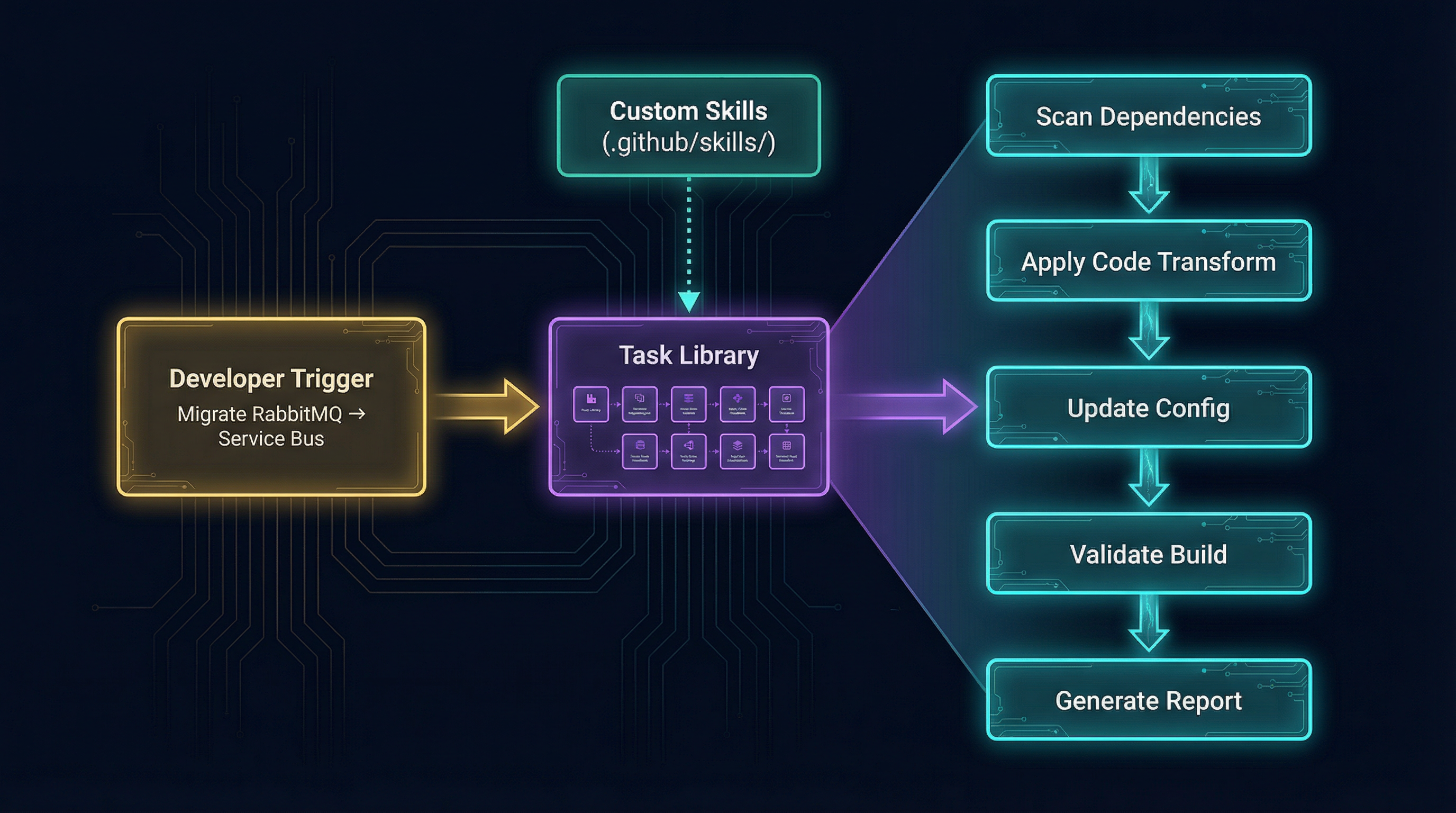
A predefined task is not just a prompt. It is a deterministic execution pipeline: pick a migration recipe, apply code transforms, update configuration, validate the build, and emit a report the team can review or fork into a custom skill.
Java predefined tasks (GA subset)
The following tasks are available for Java as of January 2026:
| Task | What it does |
|---|---|
| Spring RabbitMQ → Azure Service Bus | Converts Spring AMQP/JMS + RabbitMQ to Service Bus with Managed Identity |
| Managed Identities for Database migration | Prepares codebase for Managed Identity auth to Azure SQL, MySQL, PostgreSQL, Cosmos DB |
| Managed Identities for Credential Migration | Replaces connection strings with Managed Identity for Event Hubs and Service Bus |
| AWS S3 → Azure Storage Blob | Converts S3 SDK calls to Azure Blob Storage SDK |
| Logging to local file → Console (Azure Monitor ready) | Converts file-based logging to stdout for Azure Monitor integration |
| Local file I/O → Azure Storage File share mounts | Converts local file reads/writes to unified mount path for Azure File share |
| Java Mail → Azure Communication Service | Converts SMTP mail-sending to Azure Communication Services (solves port-25 blocking) |
| Secrets/Certificates → Azure Key Vault | Migrates hardcoded secrets and Java KeyStore TLS certs to Key Vault |
| User auth → Microsoft Entra ID | Converts LDAP-based auth to Entra ID |
| Oracle SQL → PostgreSQL | Converts Oracle-specific SQL dialect to PostgreSQL equivalents |
| AWS Secret Manager → Azure Key Vault | Converts all secret management operations to Key Vault |
| ActiveMQ → Azure Service Bus | Converts ActiveMQ producers/consumers to Service Bus with authentication best practices |
| AWS SQS → Azure Service Bus | Converts SQS queue operations to Service Bus while preserving at-least-once delivery semantics |
.NET predefined tasks (GA subset)
For .NET, the predefined task library (last updated September 2025) covers:
| Task | What it does |
|---|---|
| Managed Identity Database migration | DB2, Oracle, SQL Server → Azure SQL DB / Azure SQL MI / Azure PostgreSQL with Managed Identity |
| Azure File Storage | Local file I/O → Azure File Storage |
| Azure Blob Storage | Object storage / local file I/O → Azure Blob Storage |
| Microsoft Entra ID | Windows AD → Entra ID |
| Managed Identity + Key Vault | Plaintext credentials → Managed Identity + Key Vault |
| Azure Service Bus | MSMQ, RabbitMQ, AWS SQS → Azure Service Bus |
| Azure Communication Service email | SMTP → Azure Communication Service |
| Confluent Cloud/Azure Event Hubs (Kafka) | Local/on-premises Kafka → Confluent Cloud or Azure Event Hubs |
| OpenTelemetry on Azure | log4net, Serilog, Windows Event Log → OpenTelemetry |
| Azure Cache for Redis | Local or in-memory Redis → Azure Cache for Redis |
Why this matters architecturally
These tasks are not LLM-generated advice. They are structured, tested migration patterns that the agent executes deterministically. An enterprise with 200 Java applications that all use RabbitMQ can run a single predefined task across the entire portfolio with the modernization agent as orchestrator, rather than assigning developers to manually rework each application.
The custom skills mechanism (stored in .github/skills/ in each repository) lets teams fork any predefined
task and adapt it to their specific library versions, internal naming conventions, or organisational
standards. Those custom skills can be shared across teams and improved iteratively — this is the beginnings
of an enterprise-managed modernization playbook library inside the developer toolchain.
What Is Production-Ready vs What Is Still Preview
Being explicit about the current state is more useful than glossing over it.
| Capability | Status | Key Limitation |
|---|---|---|
| GitHub Copilot .NET automated upgrades | GA | None noted |
| GitHub Copilot Java automated upgrades | GA | Gradle wrapper 5+ required; Kotlin DSL not supported |
| Predefined tasks (Java, .NET) | GA | List is static until updated by Microsoft |
| Custom skills / task authoring | GA | Size limit on resource files |
| Azure Copilot agents (all 6) | Preview | Tenant-level gated access; gradual rollout |
| Azure Copilot migration agent | Public preview (March 2026) | No server replication; no ASR/Backup integration |
| GitHub Copilot coding agent mode | Public preview | Requires Copilot Pro/Business/Enterprise; not in managed user accounts |
| GitHub Copilot modernization agent (orchestrator) | Public preview | New capability; scope not fully documented |
| Operations Center | Preview | Gated with Agents preview access |
| Observability agent | Preview | No CMK; 40+ regions only; 48h result retention |
| Azure Copilot + GitHub Copilot assessment handshake | Preview | API and format not fully documented |
The practical implication: for an enterprise team that wants to use this stack today, the GA tier (automated upgrades and predefined tasks in the IDE) delivers real, measurable value with no access request required. The preview tier is where the architectural story becomes compelling, but it is still taking shape.
The Architectural Handoff: Why It Changes Migration Economics
Classic enterprise migration has a well-known failure mode: the infrastructure and application teams work in separate tools, with separate models of the same systems, and their assumptions only diverge and collide during final readiness review — when changes are expensive.
The handshake between Azure Copilot’s migration agent and GitHub Copilot’s modernization assessment tries to solve this structurally. Here is the intended flow:
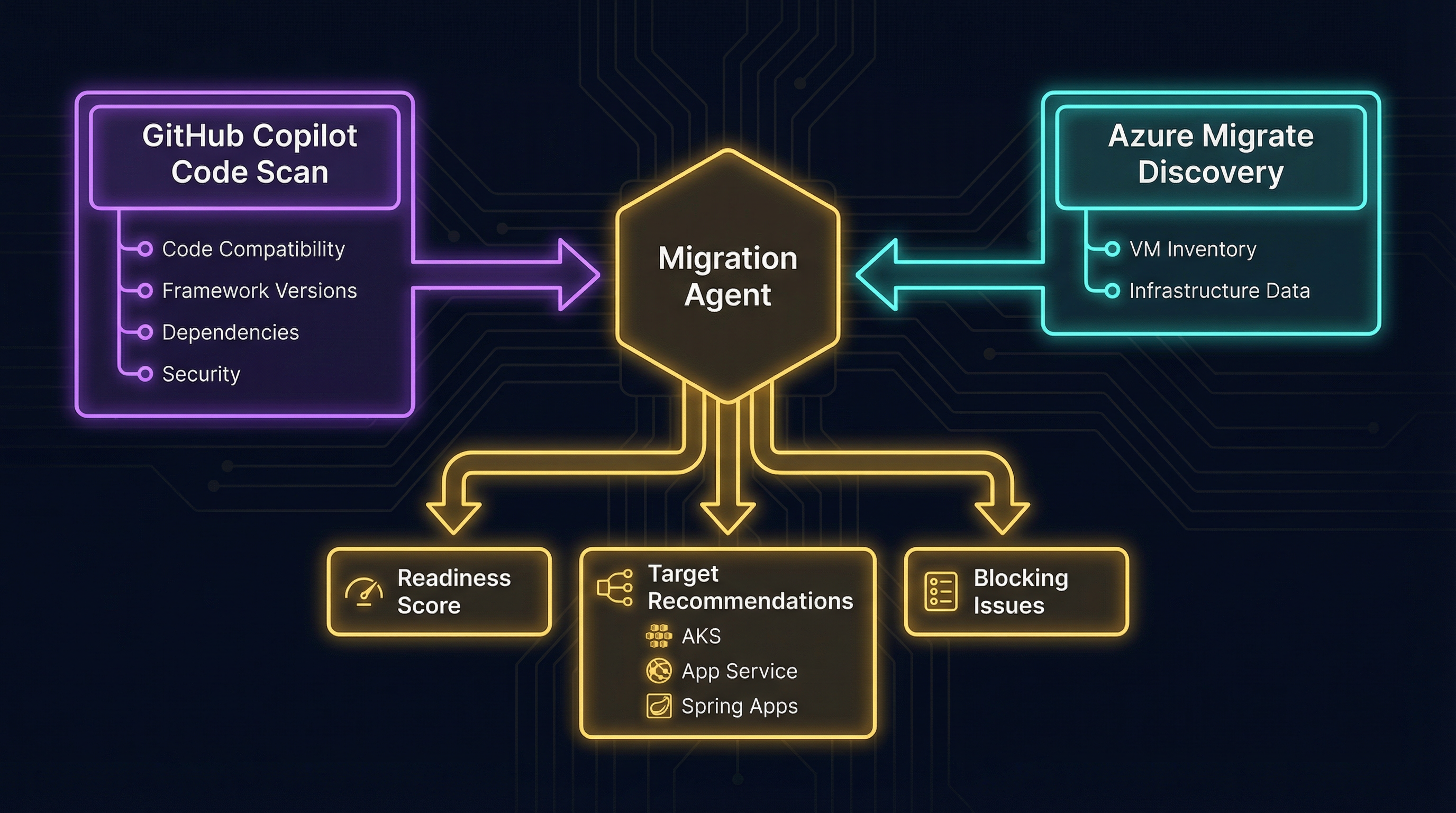
This handshake is the architectural point that matters: code reality from GitHub and infrastructure reality from Azure Migrate feed the same migration agent, which then emits readiness scores, target recommendations, and blockers instead of leaving those decisions to spreadsheet choreography.
- Developer side: GitHub Copilot modernization scans application code, produces an assessment report (framework versions, compatibility issues, dependency issues, security findings)
- Infrastructure side: Azure Copilot migration agent ingests that report alongside Azure Migrate discovery data
- Result: Azure Copilot surfaces code-level blocking issues during infrastructure planning, not after it; it can weight target recommendations (AKS vs App Service vs Azure Spring Apps) against the actual application’s readiness
This is genuinely different from running separate tools because the information flows automatically rather than through a spreadsheet handoff. Whether the current implementation is reliable enough to trust in production planning is something each team will need to validate, since the format and fidelity of the assessment reports are not yet fully specified in public documentation.
How This Differs from the Azure AI Foundry Multi-Agent Story
It is worth being direct about the distinction between this stack and the Azure AI Foundry / multi-agent systems story covered in prior analysis on this blog.
Azure AI Foundry is a platform for building custom AI agent applications. The components in that story — Semantic Kernel, AutoGen, A2A protocol, custom agent orchestrators — are tools a development team uses to build their own product.
The Azure Copilot / GitHub Copilot / Operations Center stack is Microsoft-operated agentic tooling that targets the enterprise IT and developer workflow directly, without requiring the enterprise to build anything. The agents are pre-built, Microsoft-maintained, and embedded into existing Azure and GitHub surfaces.
The two stories can intersect — a team could use Azure AI Foundry to build a custom modernization agent that calls the same APIs — but the use case, buyer, and operational model are different.
What to Watch
A few developments that will determine whether this stack delivers on its architectural promise:
Assessment report format and API: The code-assessment-to-Azure-Migrate handshake is the linchpin of the cross-layer value claim. Once Microsoft publishes the schema and the API endpoint, enterprises will be able to validate the quality and completeness of that data flow.
Predefined task expansion: The task library for Java has 13 tasks; .NET has 10. Both docs note the list will grow based on customer feedback. The breadth of that catalogue in 12 months will determine whether the predefined-task approach is a genuine portfolio modernization accelerator or a narrow set of common cases.
Operations Center GA timeline: Currently gated with Agents preview access. When it goes GA and whether CMK support arrives for the observability agent will affect regulated-industry adoption significantly.
Modernization agent portfolio scope: The orchestrator model for running concurrent modernization across many applications is the scalability story. Documentation on how it handles failures, partial completions, and review workflows across a large portfolio is not yet detailed.
Key Takeaways
- Microsoft announced the first agentic end-to-end modernization solution in March 2026, connecting Azure Copilot and GitHub Copilot into a shared migration workflow
- Azure Copilot’s migration agent (public preview) handles planning, assessment, and business case generation but cannot yet execute server replication or interact with Azure Site Recovery and Backup
- GitHub Copilot automated upgrades for .NET and Java are generally available and deliver real value today without preview access
- The predefined task library — 13 Java tasks, 10 .NET tasks — is the operationally underrated story: it turns common migration patterns into one-command, deterministic code transformations
- Operations Center is a gated preview portal that consolidates Azure Monitor, Defender, Policy, and Cost into a single surface with Copilot agents embedded; it is not yet GA
- The observability agent does not support Customer Managed Keys — a concrete blocker for regulated industries that require CMK
- The architectural value claim depends on the GitHub Copilot → Azure Copilot assessment handshake, which is real but not yet fully documented in terms of format and API surface
- Custom skills (
.github/skills/) let enterprises fork and adapt any predefined task, giving teams a mechanism to build and maintain their own modernization playbook library
Primary Sources
- Many agents, one team: Scaling modernization on Azure — Jeremy Winter, Azure Blog, March 2026
- Announcing Azure Copilot agents and AI infrastructure innovations — Jeremy Winter, Azure Blog, Ignite 2025
- Agents (preview) in Azure Copilot — Microsoft Learn
- Migration capabilities in Agents (preview) in Azure Copilot — Microsoft Learn
- Overview of Operations Center (preview) — Microsoft Learn
- Azure Copilot observability agent (preview) — Microsoft Learn
- GitHub Copilot app modernization documentation — Microsoft Learn
- Modernize Java apps using GitHub Copilot modernization in coding agent — Microsoft Learn
- Predefined tasks for GitHub Copilot modernization for Java developers — Microsoft Learn
- Quickstart: create and apply your own skills for GitHub Copilot modernization — Microsoft Learn
- Predefined tasks for GitHub Copilot modernization for .NET — Microsoft Learn