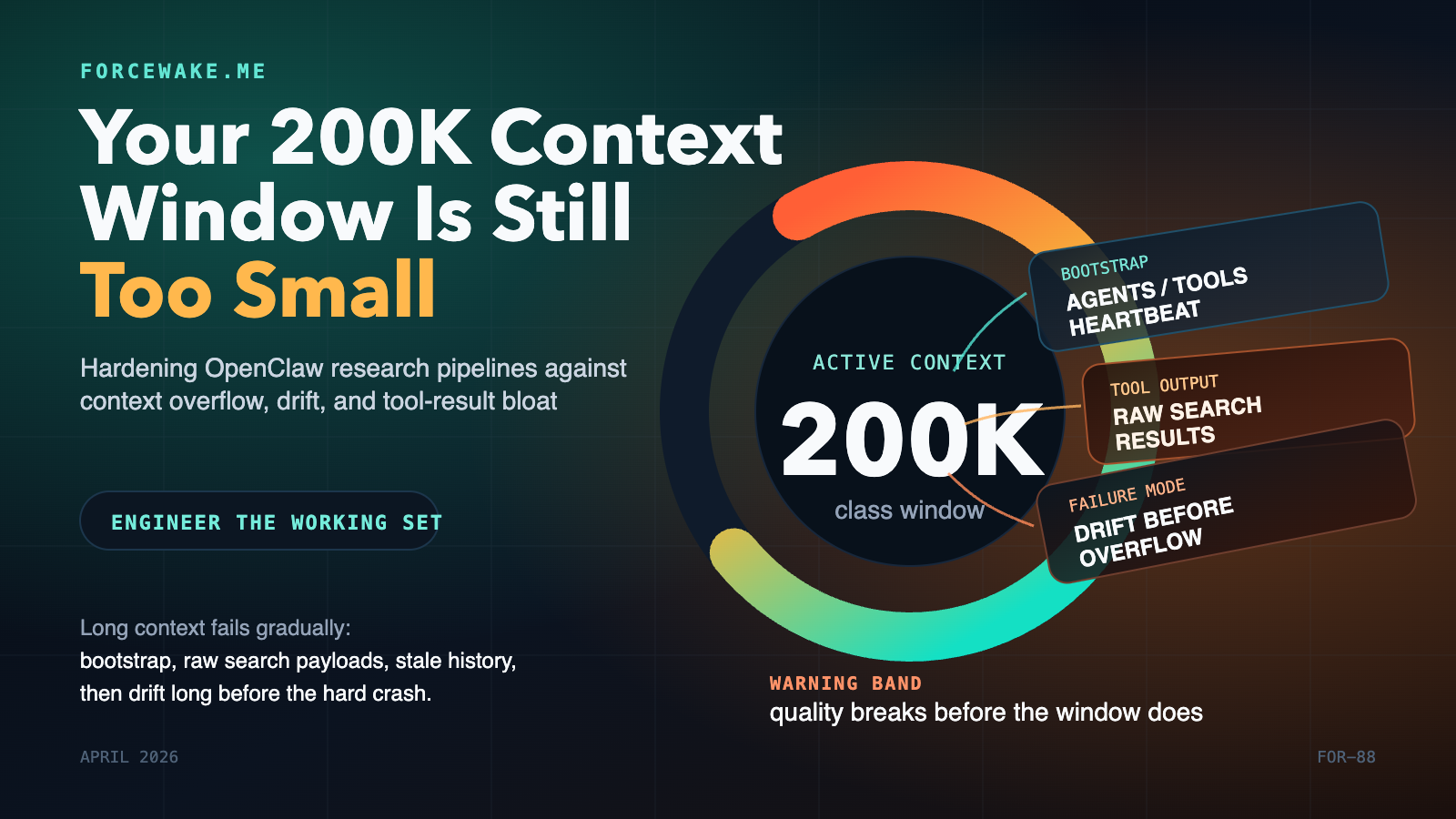
Most research-agent failures are not model failures. They are context-budget failures.
You give the agent a large context window, then quietly burn it on bootstrap files, tool schemas, verbose search results, stale heartbeat history, and repeated prompt reinjection. The run still looks healthy for a while, but quality has already started to slide. The agent drifts, repeats searches, forgets what it just learned, or falls into overflow recovery loops.
As of April 15, 2026, OpenClaw already exposes the right primitives to prevent that: detailed context introspection, isolated cron sessions, lightweight bootstrap context, session pruning, compaction, and heartbeat isolation. The engineering problem is not missing features. It is composing those features into a system that keeps the model’s active working set small, fresh, and task-specific. S1 S2 S3 S4 S5
The deeper reason this matters is that long context is not the same thing as robust working memory. Lost in the Middle showed in 2024 that model performance can degrade sharply when relevant information sits in the middle of long inputs. In late 2025, Lost in the Maze showed the same pattern at the agentic-search level: long-horizon web agents struggle because they accumulate noisy content, hit context and tool budgets, or stop early. That is exactly the failure profile you see in unattended research pipelines. S6 S7
At a Glance
- A 200K-class context window is a shared budget, not free space for your prompt, search results, history, and answers all at once. S1 S2
- OpenClaw’s docs explicitly say that system prompt text, conversation history, tool calls and tool results, attachments, and even pruning artifacts count toward the context window. S1
- The first hardening move is not better prompting. It is shrinking what gets injected at all: isolated cron sessions,
--light-context, bootstrap caps, and continuation-skip. S2 S4 - The second move is pruning tool output before compaction. Session pruning trims old tool results in memory; compaction summarizes the conversation persistently. You want both. S3 S5
- Heartbeats should behave like monitors, not memory-heavy collaborators. OpenClaw now supports
lightContext: trueandisolatedSession: truefor exactly that reason. S2 - In my own OpenClaw + Exa deployment, these controls cut measured token burn by roughly half on research crons and by roughly 95% on heartbeat runs. Those numbers are field measurements from one pipeline, not product guarantees.
The Context Window Is a Ceiling, Not Your Working Set
The purpose of this section is simple: separate the advertised context limit from the budget you can safely operate inside.
OpenClaw’s own context documentation is unusually clear here. It says everything the model receives counts, including the system prompt, conversation history, tool calls and tool results, attachments, compaction summaries, and pruning artifacts. The same page also documents that OpenClaw injects a fixed bootstrap set by default: AGENTS.md, SOUL.md, TOOLS.md, IDENTITY.md, USER.md, HEARTBEAT.md, and first-run BOOTSTRAP.md. Per-file bootstrap injection defaults to 20,000 characters, and total bootstrap injection defaults to 150,000 characters before truncation. S1 S2
That should change how you think about “a 200K window.” The model does not receive 200K tokens of useful reasoning state. It receives a mixed bag of:
- mandatory runtime scaffolding,
- workspace instructions,
- tool schemas,
- tool outputs,
- prior turns,
- and whatever headroom remains for the next completion.
OpenClaw’s context page even shows tool schema payloads consuming meaningful budget in their own right. That is not a bug. It is what tool-using agents cost. S1
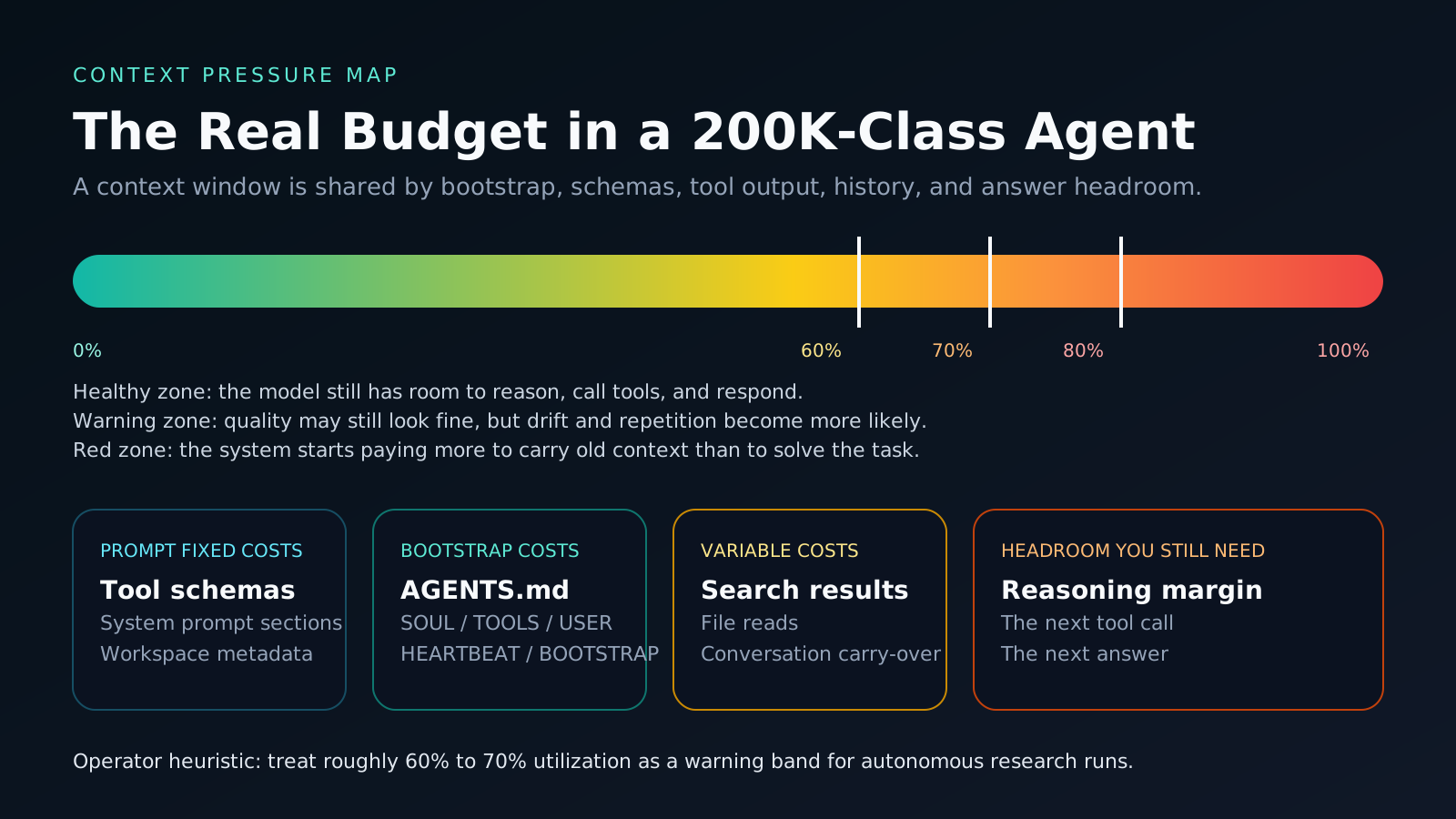
The academic literature points in the same direction. Lost in the Middle found that current long-context models do not robustly use information across long inputs and often perform best when relevant information appears at the beginning or end, degrading when the important material sits in the middle. Lost in the Maze extends that result into long-horizon web agents, arguing that context limitations are a primary reason popular agentic-search frameworks fail to scale cleanly over long trajectories. S6 S7
That is why I use a blunt operator heuristic: for autonomous research pipelines, treat roughly 60% to 70% of the advertised window as a warning band, not a comfort zone. That threshold is my operational rule, not an OpenClaw limit. The point is not the exact number. The point is that quality degradation arrives before the hard stop.
The Failure Model in an OpenClaw Research Loop
This chapter matters because “context overflow” is usually not one problem. It is several smaller problems stacking in the same direction.
In a research pipeline built around OpenClaw, isolated cron runs, and verbose web-search tools, context pressure tends to grow through four channels at once:
- Bootstrap bloat. The agent starts by loading workspace bootstrap files that are useful for interactive work but excessive for a narrow cron task. S1 S2
- Tool-result accumulation. Search and file-read tools return long payloads, and OpenClaw counts those payloads toward the model context like any other input. S1 S3
- Late intervention. If you rely only on compaction, the system does not intervene until the session is already large enough to justify summarization or overflow recovery. S5
- Heartbeat history drag. A background heartbeat that reopens full conversation history is effectively paying the cost of your entire past session to answer a tiny monitoring question. S2
flowchart LR
  A["Cron turn starts"] --> B["Bootstrap files injected"]
  B --> C["Tool schemas and runtime prompt"]
  C --> D["Search results accumulate"]
  D --> E["Old tool output remains in context"]
  E --> F["Model loses headroom"]
  F --> G["Drift, repeats, or overflow"]
The numbers below come from one real OpenClaw + Exa research pipeline I hardened in April 2026. They are useful because they show scale, not because they are universal.
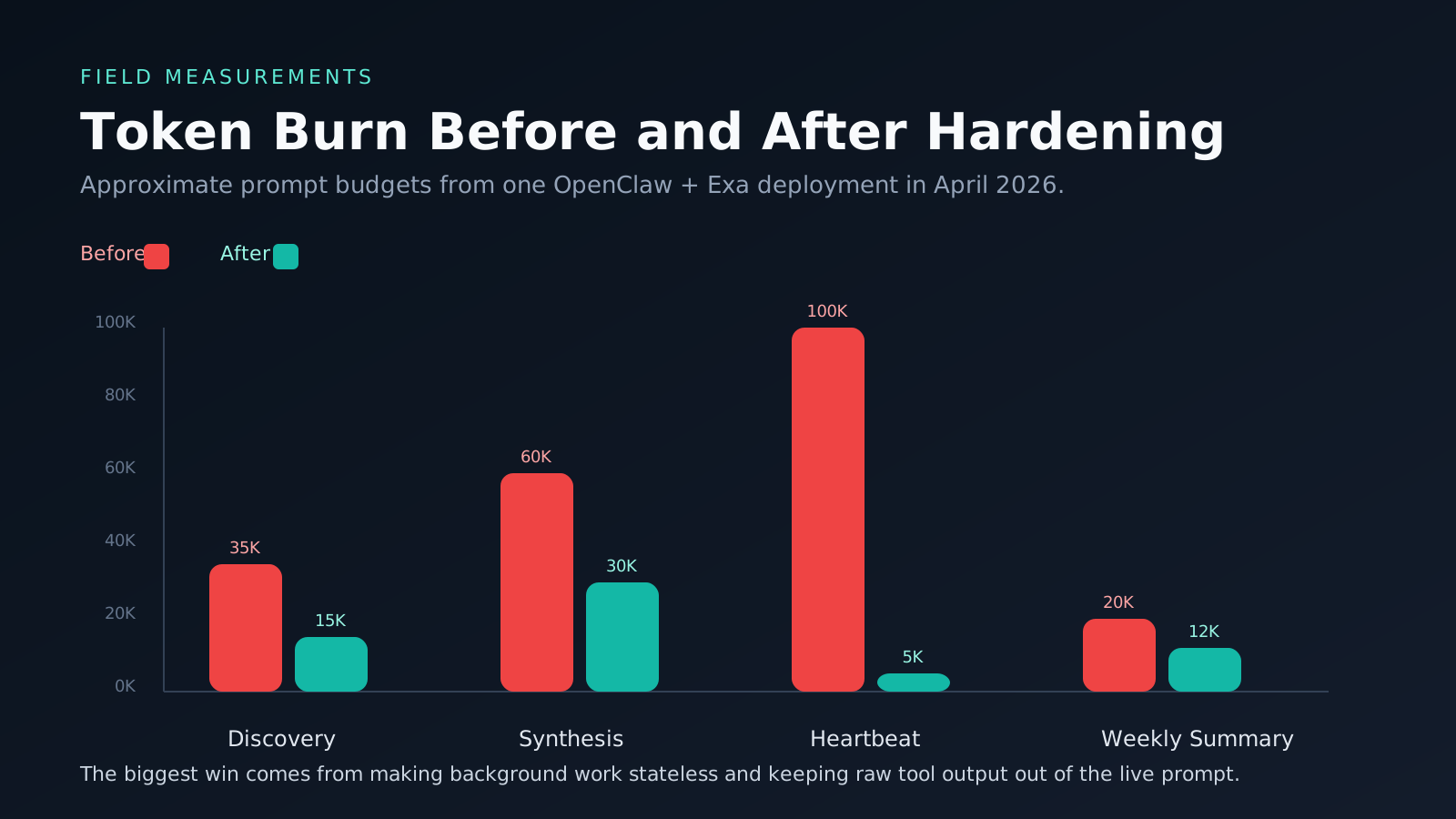
| Pipeline stage | Before hardening | After hardening | Primary reason |
|---|---|---|---|
| Discovery cron | ~35K tokens | ~10K-15K tokens | lightweight bootstrap + tighter task scope |
| Synthesis cron | ~50K-60K tokens | ~20K-30K tokens | pruning + isolated stage design |
| Heartbeat | ~100K tokens | ~2K-5K tokens | isolated session + light context |
| Weekly summary | ~20K tokens | ~8K-12K tokens | reduced carry-over and cleaner prompt budgets |
The interesting point is not that overflow disappeared. The interesting point is that agent quality improved before the hard limit mattered, because the working set became cleaner.
The Control Stack That Actually Fixes It
You do not solve this class of problem with one switch. You solve it by controlling what enters context, what stays there, and when the system is allowed to summarize.
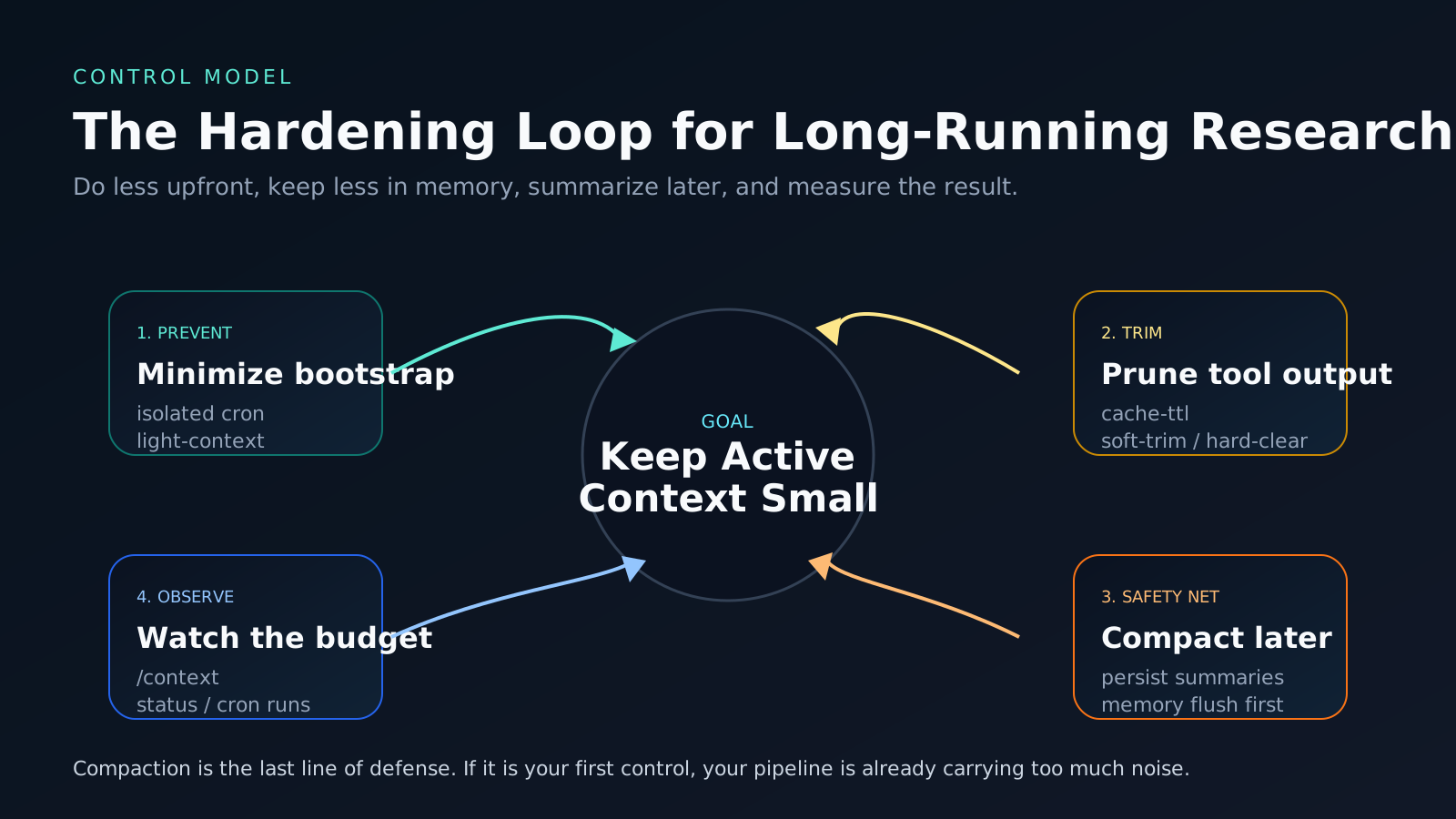
OpenClaw gives you four distinct control layers:
- Prevent unnecessary context injection.
- Prune stale tool payloads from the in-memory prompt.
- Compact the remaining conversation when the session truly grows long.
- Observe the resulting budget so regressions show up quickly. S1 S3 S5
The mistake is to jump straight to compaction. Compaction is a safety net. It is not the first line of defense.
Pattern 1: Strip Bootstrap from Isolated Cron Jobs
The purpose of this pattern is to stop paying interactive-workspace costs for single-purpose research jobs.
OpenClaw’s cron docs explicitly say that --light-context applies to isolated agent-turn jobs and keeps bootstrap context empty instead of injecting the full workspace bootstrap set. OpenClaw’s context docs then explain what that full bootstrap set normally includes, and the configuration reference documents the default bootstrap caps. S1 S2 S4
That combination leads to a simple rule:
- if the job is a narrow cron stage,
- and it does not need the whole workspace instruction stack,
- run it in an isolated session with light context.
openclaw cron edit <job-id> --session isolated --light-context
I also recommend explicitly capping bootstrap size even for non-light jobs:
{
  agents: {
    defaults: {
      bootstrapMaxChars: 15000,
      bootstrapTotalMaxChars: 150000
    }
  }
}
Tradeoff: the cron prompt now carries more responsibility, because it can no longer rely on a thick workspace bootstrap to clarify behavior.
Failure mode: If you remove too much shared instruction context, the job can become underspecified and do the wrong thing cleanly.
Mitigation: Put the minimum task contract directly in the cron prompt. Keep it explicit: one stage, one outcome, one output budget.
Pattern 2: Prune Tool Results Before Compaction
This is the most important hardening step in tool-heavy research pipelines.
OpenClaw’s session-pruning docs say pruning trims old tool results from the context before each LLM call, leaves normal conversation text alone, and is in-memory only, preserving the on-disk transcript. The same docs explain the mechanism: wait for cache TTL expiry, then soft-trim oversized results, then hard-clear older ones if needed. The configuration reference documents the exact contextPruning knobs. S2 S3
That matters because raw search output is rarely worth carrying forward verbatim. By the time the agent has already summarized a search result and decided what matters, the full earlier payload is usually just context ballast.
{
  agents: {
    defaults: {
      contextPruning: {
        mode: "cache-ttl",
        ttl: "5m",
        keepLastAssistants: 3,
        softTrimRatio: 0.3,
        hardClearRatio: 0.5,
        minPrunableToolChars: 50000,
        softTrim: { maxChars: 4000, headChars: 1500, tailChars: 1500 },
        hardClear: {
          enabled: true,
          placeholder: "[Old tool result content cleared]"
        }
      }
    }
  }
}
Why not rely on compaction instead? Because compaction is designed to summarize the broader session and preserve recent messages. OpenClaw’s deep-dive docs describe it as a persisted summary step, triggered either by overflow recovery or when the session crosses a threshold relative to model headroom. That is later and heavier than simple tool-output trimming. S5
Failure mode: Pruning too aggressively can make postmortem debugging harder if you expected the live prompt to behave like a log archive.
Mitigation: Remember the transcript is still intact. Use pruning for live prompt hygiene and keep durable artifacts for anything you may need later.
Pattern 3: Treat Heartbeats as Monitors, Not Collaborators
The purpose of this pattern is to stop tiny background checks from reopening huge session histories.
OpenClaw’s configuration reference documents two heartbeat settings that matter here:
lightContext: truekeeps onlyHEARTBEAT.mdfrom workspace bootstrap files.isolatedSession: trueruns each heartbeat in a fresh session with no prior conversation history.
The docs go further and state the practical payoff: this can reduce per-heartbeat token cost from roughly 100K down to 2K-5K. S2
{
  agents: {
    defaults: {
      heartbeat: {
        every: "30m",
        lightContext: true,
        isolatedSession: true,
        prompt: "Check pipeline health, pending cron failures, and delivery status."
      }
    }
  }
}
Tradeoff: an isolated heartbeat has almost no conversational memory.
That is fine. A heartbeat should not be “thinking with history.” It should be evaluating health against explicit signals: run status, queue depth, failure counts, or a compact checklist in HEARTBEAT.md.
Failure mode: Teams often turn heartbeats into mini-agents that try to reason across the entire workspace and recent conversation.
Mitigation: Do not. Keep heartbeats narrow, measurable, and stateless by default.
Pattern 4: Stop Re-Injecting the Same Bootstrap on Continuation Turns
This pattern is about not paying the same prompt tax again and again inside the same task flow.
The configuration reference documents contextInjection: "continuation-skip" as a mode where safe continuation turns skip workspace bootstrap reinjection, reducing prompt size, while heartbeat runs and post-compaction retries still rebuild context when needed. S2
{
  agents: {
    defaults: {
      contextInjection: "continuation-skip"
    }
  }
}
This is especially helpful when a run has already established the right local context and is now doing follow-up tool work. Without continuation-skip, the system keeps paying for the same workspace bootstrap over and over.
Failure mode: If your workflow depends on every follow-up turn seeing newly edited bootstrap files immediately, continuation-skip can delay that effect.
Mitigation: Use fresh sessions for major task boundaries. Treat continuation-skip as an efficiency optimization for stable mid-task turns, not as a substitute for explicit state transitions.
Pattern 5: Use Silent Housekeeping for Background Work
Not every useful turn should become visible chat output.
OpenClaw’s deep-dive docs document the NO_REPLY convention for silent turns and use the same mechanism for pre-compaction memory flushes. Before auto-compaction happens, OpenClaw can trigger a silent “write memory now” turn so durable state is written to disk before summarization discards detail. S5
This is a subtle but important design move. If a background research stage is only updating durable artifacts or internal state, visible delivery is often noise. Keep the user-facing surface for meaningful summaries and approvals.
Failure mode: Background stages that emit verbose intermediate chatter can create the exact context sprawl you were trying to avoid.
Mitigation: Use silent housekeeping for state-preserving maintenance and reserve visible output for the human decision points.
Observability and SLO Model
If you cannot answer “what entered context, what got trimmed, and why the run retried,” you do not have a hardened pipeline. You have a lucky one.
OpenClaw’s docs expose the right inspection surfaces:
/contextand/context detailfor prompt composition and budget breakdowns, including injected workspace files and tool-schema costs. S1/statusoropenclaw statusfor session and compaction visibility. S5openclaw sessions --jsonfor token counters and session metadata. S5openclaw cron runs --id <job-id>for isolated-job history and final outcomes. S4
The deep-dive docs also make an important point many teams miss: contextTokens in the session store is a runtime estimate for monitoring, not a strict guarantee of actual model-visible tokens. That makes it a great SLO signal and a poor excuse for sloppy prompt design. S5
My recommended minimum operating SLOs for a research pipeline look like this:
| Signal | Target | Why it matters |
|---|---|---|
| Bootstrap share of prompt budget | < 20% on isolated cron jobs | If bootstrap dominates the prompt, the stage is underspecified or over-injected |
| Auto-compactions during a single isolated cron run | 0 | Compaction during a narrow cron stage usually means the stage is carrying too much raw material |
| Heartbeat prompt budget | < 5K tokens | A heartbeat should monitor, not reopen the world |
| Duplicate search/query retries within one stage | 0-1 max | Repeated searches are an early sign of drift or forgotten state |
| Time to explain a failed run from telemetry | < 10 minutes | If incident response starts with guesswork, the controls are incomplete |
Failure mode: Teams often monitor only “did the job succeed?” and miss the fact that it succeeded inefficiently, near the edge, or with repeated tool waste.
Mitigation: Track prompt-budget health as a first-class reliability signal, not just a billing footnote.
Rollout Plan With Checkpoints
The purpose of this section is to keep the hardening sequence practical. Do not flip every switch at once.
- Measure the current state. Capture prompt budgets, compaction count, duplicate searches, and heartbeat token burn for the last 10 runs.
- Move narrow cron jobs to isolated + light context. This usually gives the fastest token savings with the lowest conceptual risk. S4
- Enable context pruning conservatively. Start with cache-TTL pruning and keep the last few assistant turns intact. S2 S3
- Isolate heartbeats. If a heartbeat is reopening large history, fix that before you touch more subtle controls. S2
- Add continuation-skip and bootstrap caps. This is the cleanup pass that prevents regression. S2
- Define redlines. Decide what prompt budget, compaction frequency, and duplicate-search count mean “stop rollout and investigate.”
The checkpoint after each step is simple:
- Did prompt size go down?
- Did the agent still complete the task correctly?
- Did the run become easier to explain from telemetry?
If the answer to the third question is “no,” the optimization is incomplete.
The Real Lesson
The most important thing I learned from hardening this pipeline is that long-context agents do not fail in one dramatic moment. They usually fail gradually, by carrying too much irrelevant state for too long.
OpenClaw’s current feature set is already enough to build a disciplined research loop. The engineering bar is to treat context as an operational resource: budget it, cap it, trim it, and observe it the way you would CPU, memory, or queue depth. Once you do that, “context overflow” stops being a mysterious model problem and becomes a systems problem you can actually manage. S1 S2 S3 S4 S5 S6 S7
Source Mapping
- S1: OpenClaw, Context (official docs; verified April 15, 2026) - https://docs.openclaw.ai/concepts/context
- S2: OpenClaw, Configuration Reference (official docs; verified April 15, 2026) - https://docs.openclaw.ai/gateway/configuration-reference
- S3: OpenClaw, Session Pruning (official docs; verified April 15, 2026) - https://docs.openclaw.ai/concepts/session-pruning
- S4: OpenClaw, cron CLI reference (official docs; verified April 15, 2026) - https://docs.openclaw.ai/cli/cron
- S5: OpenClaw, Session Management Deep Dive (official docs; verified April 15, 2026) - https://docs.openclaw.ai/reference/session-management-compaction
- S6: Liu et al., Lost in the Middle: How Language Models Use Long Contexts (TACL 2024) - https://aclanthology.org/2024.tacl-1.9/
- S7: Yen et al., Lost in the Maze: Overcoming Context Limitations in Long-Horizon Agentic Search (arXiv, submitted October 21, 2025) - https://arxiv.org/abs/2510.18939